

Modern server room with network racks, glowing switches, routers, and neatly organized fiber optic cables in blue-lit corridor
What Is Network Bandwidth?

Content
Content
Network performance issues rarely announce themselves politely. A video conference freezes mid-presentation, a file upload times out, or an entire office grinds to a halt because someone decided to stream a 4K movie during peak hours. Behind most of these frustrations lies a single culprit: insufficient or poorly managed network bandwidth.
Understanding and monitoring bandwidth isn't just an IT department concern anymore. Whether you're running a three-person startup or managing enterprise infrastructure, knowing how data flows through your network—and where it gets stuck—directly impacts productivity, customer satisfaction, and your bottom line.
Understanding Network Bandwidth
Network bandwidth represents the maximum data transfer capacity of a network connection, measured in bits per second. Think of it as the width of a highway: a wider road allows more vehicles to travel simultaneously, just as higher bandwidth permits more data to move through your network at once.
Most connections today measure bandwidth in megabits per second (Mbps) or gigabits per second (Gbps). A standard business internet connection might offer 100 Mbps, while enterprise fiber links can reach 10 Gbps or higher. That "bits" distinction matters—when you download a file showing transfer speeds in megabytes per second (MBps), you're seeing one-eighth of the actual bit rate, since eight bits equal one byte.
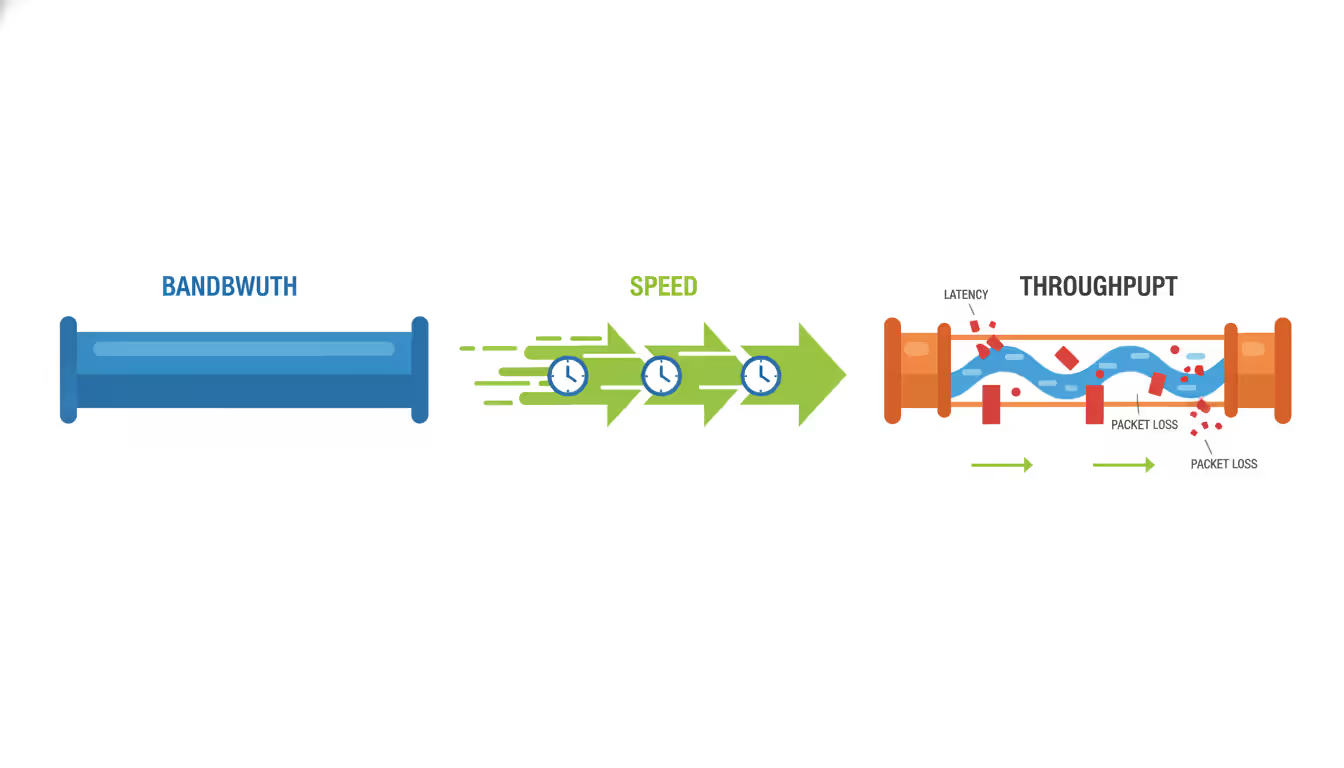
Bandwidth differs fundamentally from speed and throughput, though people often confuse these terms. Bandwidth is your maximum theoretical capacity. Speed refers to how fast data actually moves, which depends on latency and processing time. Throughput measures the actual amount of data successfully transferred over time, accounting for packet loss, retransmissions, and protocol overhead.
Author: Derek Hollowell;
Source: clatsopcountygensoc.com
A 1 Gbps connection doesn't guarantee 1 Gbps throughput. Real-world factors—network congestion, packet collisions, protocol inefficiencies—typically reduce actual throughput to 70-90% of rated bandwidth under ideal conditions. During peak usage or with poor network health, that percentage drops further.
Network engineers also distinguish between symmetric and asymmetric bandwidth. Symmetric connections provide equal upload and download capacity (common in business fiber), while asymmetric connections (typical in residential cable or DSL) offer much higher download than upload speeds. A 200/10 Mbps connection might work fine for browsing but creates bottlenecks when hosting video calls or backing up data to the cloud.
How Network Bandwidth Affects Performance
Bandwidth constraints ripple through every aspect of digital operations. An accounting firm with 50 employees sharing a 100 Mbps connection might function smoothly until month-end, when simultaneous access to cloud-based financial systems brings everything to a crawl. The bandwidth hasn't changed, but demand has exceeded capacity.
Video conferencing exposes bandwidth limitations quickly. A standard Zoom call requires 2-3 Mbps per participant for decent quality. Ten simultaneous calls consume 30 Mbps minimum, leaving little headroom for other activities. High-definition conferencing can demand 5-8 Mbps per stream, and 4K video collaboration tools require even more. Without adequate bandwidth, participants experience frozen frames, audio dropouts, and that awkward "Can you hear me?" loop.
File transfers scale directly with available bandwidth. Uploading a 10 GB dataset over a 100 Mbps connection takes roughly 13 minutes under perfect conditions. That same transfer over a 20 Mbps connection stretches to over an hour. For businesses moving large files regularly—design agencies sharing video assets, medical practices transmitting imaging data, software companies deploying builds—bandwidth directly translates to billable hours saved or wasted.
Application performance suffers less obviously but just as significantly. Cloud-based CRM systems, ERP platforms, and productivity suites constantly sync data in the background. Insufficient bandwidth creates lag between user actions and system responses. A salesperson updating a customer record might wait five seconds for the save to confirm—multiply that across hundreds of daily interactions, and you've built frustration into your workflow.
E-commerce operations face direct revenue impact from bandwidth constraints. A retail site serving product images, running recommendation engines, and processing transactions needs consistent throughput. During flash sales or holiday peaks, bandwidth bottlenecks translate to abandoned carts and lost sales. Amazon famously calculated that every 100ms of latency costs them 1% in sales—bandwidth limitations are often the root cause of those delays.
Common Causes of Bandwidth Bottlenecks
Network congestion remains the most frequent bandwidth thief. When too many devices or applications compete for limited capacity, performance degrades for everyone. This often follows predictable patterns: morning login storms when employees start work, lunch-hour streaming, end-of-day cloud backups. Less predictable congestion comes from software updates pushing automatically to dozens of machines or a single user transferring massive files without awareness of network impact.
Outdated hardware creates artificial bottlenecks even when internet bandwidth is adequate. A router or switch with 100 Mbps ports can't take advantage of a 1 Gbps connection. Old network cards, aging cables rated for lower speeds, or overloaded firewalls processing too much traffic for their CPU capacity all constrain throughput. Many organizations upgrade their internet service without auditing internal infrastructure, then wonder why performance didn't improve.

Author: Derek Hollowell;
Source: clatsopcountygensoc.com
Malware and security breaches consume bandwidth through botnet activity, cryptocurrency mining, or data exfiltration. A compromised machine participating in a distributed denial-of-service attack might saturate your upload bandwidth without obvious symptoms on that device. Ransomware often communicates with command servers and attempts to spread across networks, generating abnormal traffic patterns that steal bandwidth from legitimate uses.
Unauthorized usage takes multiple forms. Employees streaming personal content, running file-sharing applications, or connecting unauthorized devices all drain capacity. Guest networks without proper isolation can bleed into business bandwidth. Shadow IT—departments deploying cloud services without IT approval—creates unexpected bandwidth demands that weren't accounted for in capacity planning.
Poor configuration wastes bandwidth through inefficiency. Networks without Quality of Service (QoS) policies treat all traffic equally, letting bulk downloads compete with latency-sensitive voice calls. Broadcast storms from misconfigured switches can flood networks with redundant traffic. Suboptimal routing sends data through congested paths when faster routes exist. DNS issues cause excessive retries and timeouts that consume bandwidth without delivering value.
Insufficient capacity planning leaves networks perpetually behind demand. Bandwidth requirements grow as businesses adopt cloud services, increase remote work, deploy IoT devices, and expand operations. An adequate connection in 2024 becomes constraining by 2026 without proactive upgrades. Organizations that provision bandwidth based on average usage rather than peak demand guarantee periodic performance problems.
How Network Bandwidth Monitoring Works
Network bandwidth monitoring continuously tracks data flow across connections, devices, and applications to identify usage patterns, detect anomalies, and prevent congestion. Rather than waiting for users to complain about slow performance, monitoring provides real-time visibility into what's consuming bandwidth and where bottlenecks form.
Most monitoring solutions use Simple Network Management Protocol (SNMP) to query network devices for traffic statistics. Routers, switches, and firewalls maintain counters tracking bytes sent and received on each interface. Monitoring tools poll these counters at regular intervals—typically every 30 to 60 seconds—and calculate bandwidth usage based on the difference between readings.
Flow-based monitoring provides deeper insight by examining actual traffic patterns. Technologies like NetFlow (Cisco), sFlow, jFlow, and IPFIX capture metadata about network conversations: source and destination addresses, ports, protocols, and byte counts. This granular data reveals not just how much bandwidth is used, but which applications and users are consuming it. You can see that 40% of your bandwidth goes to video streaming, identify the specific devices involved, and make informed policy decisions.

Author: Derek Hollowell;
Source: clatsopcountygensoc.com
Packet capture and deep packet inspection (DPI) offer the most detailed view by analyzing actual packet contents. This approach identifies specific applications even when they use non-standard ports or encryption. DPI can distinguish between Netflix traffic and a business video conference, or separate legitimate cloud backup from suspicious data exfiltration. However, this method requires more processing power and raises privacy considerations, so it's typically deployed selectively rather than network-wide.
Key metrics extend beyond simple bandwidth percentage. Utilization shows current usage as a percentage of capacity—sustained utilization above 70-80% typically indicates the need for capacity upgrades. Error rates and packet loss reveal quality issues that reduce effective throughput. Latency measurements identify delays that impact application performance. Top talkers lists show which devices or applications consume the most bandwidth, focusing troubleshooting efforts.
Baseline establishment makes monitoring meaningful. A monitoring tool that shows 60 Mbps usage on a 100 Mbps connection provides little context alone. But when you know typical usage ranges from 30-50 Mbps, that 60 Mbps spike becomes significant. Monitoring systems build baselines by tracking patterns over days and weeks, then alert when current behavior deviates from established norms.
Threshold-based alerting prevents information overload. Rather than generating constant notifications, effective monitoring triggers alerts only when metrics exceed defined limits: bandwidth utilization above 85%, error rates above 1%, or specific applications consuming more than their allocated share. Alert fatigue from too many notifications trains administrators to ignore warnings, defeating the monitoring purpose.
Choosing a Network Bandwidth Monitoring Tool
Selecting monitoring software requires balancing features, complexity, and cost against your specific needs. A small business with a single internet connection has different requirements than an enterprise with multiple sites, dozens of network segments, and thousands of devices.
Real-time visibility stands as the foundational feature. You need to see current bandwidth usage immediately when investigating performance complaints, not wait for reports to generate. Live dashboards showing utilization graphs, top bandwidth consumers, and active alerts enable rapid response to developing issues.
Historical reporting and trend analysis inform capacity planning and policy decisions. Being able to review bandwidth usage over the past month, quarter, or year reveals growth patterns and seasonal variations. You can justify bandwidth upgrades with concrete data showing consistent peak usage approaching capacity limits, or identify gradual increases that will require action within months.
Alerting capabilities must be flexible and reliable. Configurable thresholds for different times of day accommodate expected variations—higher usage during business hours shouldn't trigger alerts meant to catch after-hours anomalies. Multiple notification methods (email, SMS, Slack, PagerDuty integration) ensure the right people receive alerts through their preferred channels. Alert escalation automatically notifies management if initial alerts go unacknowledged.
Scalability determines whether a tool grows with your network or requires replacement as you expand. Can it monitor ten devices today and a thousand devices next year? Does pricing scale linearly or does bulk licensing reduce per-device costs? Cloud-based monitoring solutions often scale more easily than on-premises tools that require hardware upgrades to handle additional load.
Integration with existing infrastructure prevents monitoring silos. Tools that work with your current routers, switches, and firewalls without requiring specialized hardware reduce deployment friction. API access allows integration with ticketing systems, automation platforms, and custom dashboards. Support for standard protocols (SNMP, NetFlow, syslog) ensures compatibility across multi-vendor environments.
Deployment complexity affects time-to-value. Agentless monitoring that relies on SNMP and flow data requires minimal setup—configure device credentials and start collecting data. Agent-based approaches that install software on monitored devices provide deeper visibility but demand more deployment effort. Cloud-based monitoring eliminates server maintenance but requires sending traffic data to external services, which may conflict with security policies.
Reporting customization lets you present data meaningfully to different audiences. Network administrators need technical details about packet loss and protocol distribution. Executives want high-level summaries showing bandwidth costs, usage trends, and capacity planning recommendations. Custom reports, scheduled delivery, and export options ensure stakeholders receive relevant information in digestible formats.
Free vs. Paid Bandwidth Analyzers
Free bandwidth monitoring tools offer surprising capability for small networks and budget-conscious organizations. PRTG Network Monitor provides free monitoring for up to 100 sensors, sufficient for small businesses. Nagios Core delivers enterprise-grade monitoring with steep learning curves but no licensing costs. LibreNMS offers comprehensive open-source monitoring for unlimited devices with active community support.
These free options share common limitations. Support comes from community forums rather than dedicated help desks—acceptable when you have in-house expertise, frustrating when you need immediate assistance during outages. Updates and new features arrive on community timelines, not vendor roadmaps aligned with your needs. Documentation varies from excellent to sparse depending on project maturity and contributor engagement.
Commercial solutions trade licensing costs for polish, support, and advanced features. SolarWinds Network Performance Monitor, PRTG's paid tiers, Paessler, and ManageEngine OpManager provide professional interfaces, comprehensive documentation, and responsive support teams. They include pre-built dashboards for common scenarios, automated discovery that maps your network with minimal configuration, and regular updates adding new device support and features.
Advanced capabilities typically remain commercial-only. Predictive analytics that forecast capacity needs based on trend analysis, AI-powered anomaly detection that identifies unusual patterns without manual threshold configuration, and sophisticated reporting with executive-ready visualizations justify paid tool investments for larger organizations. Integration with enterprise management platforms, single sign-on support, and compliance reporting features address enterprise requirements that open-source projects rarely prioritize.
The free-versus-paid decision often comes down to opportunity cost. A free tool requiring 20 hours of setup and configuration might save licensing fees but cost more in administrator time than a commercial solution deployed in two hours. For networks with dedicated IT staff and technical expertise, free tools provide excellent value. For organizations where IT handles multiple responsibilities or lacks specialized networking knowledge, commercial tools' ease of use and support justify their expense.
| Feature | Free Tools | Commercial Tools |
| Real-time monitoring | Yes, basic graphs and metrics | Yes, with advanced visualizations |
| Historical reporting | Limited retention, basic reports | Extensive retention, customizable reports |
| Alerting | Email and basic notifications | Multi-channel, escalation, intelligent alerts |
| Device capacity | Limited (100-500 devices typical) | Unlimited or high limits (1,000-10,000+) |
| Deployment complexity | Moderate to high, manual configuration | Low, automated discovery and setup |
| Support | Community forums, documentation | Dedicated support teams, SLAs |
| Typical use case | Small networks, technical users | Enterprise networks, varied skill levels |
Best Practices for Managing Network Bandwidth
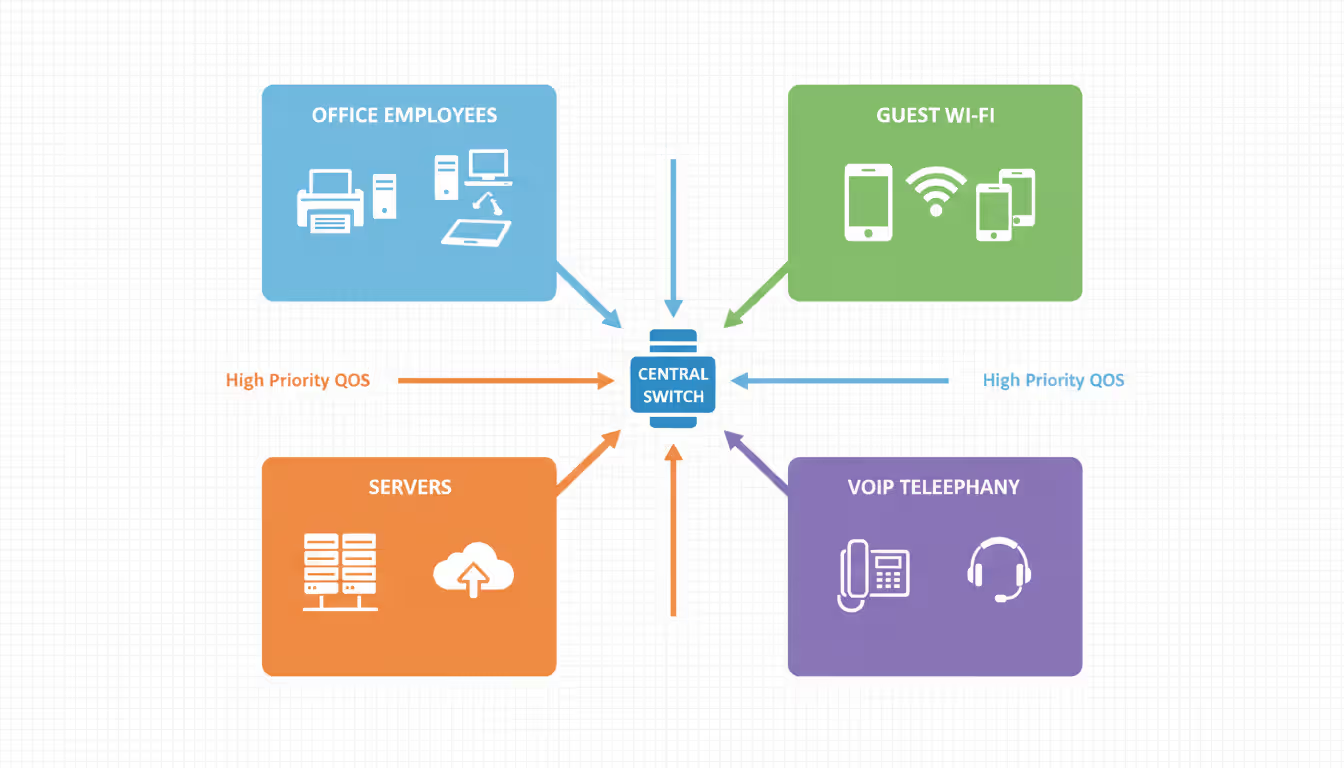
Traffic prioritization through Quality of Service policies ensures critical applications receive necessary bandwidth even during congestion. QoS tags packets by priority: voice and video conferencing get highest priority for low latency, transactional business applications receive medium priority for consistent throughput, and bulk transfers like backups accept lowest priority to use available bandwidth without impacting other traffic.
Implementing QoS requires identifying which applications matter most to your operations. A design firm prioritizes file transfers to clients and cloud rendering services. A call center ensures voice traffic takes precedence over everything else. A healthcare provider prioritizes electronic health record access and telemedicine platforms. Document these priorities in a formal policy before configuring network devices, ensuring technical implementation aligns with business requirements.
Regular bandwidth audits reveal usage patterns and optimization opportunities. Monthly reviews of monitoring data identify trends: Is bandwidth consumption growing steadily, suggesting the need for capacity upgrades? Are specific applications or users consistently consuming disproportionate resources? Do usage patterns show opportunities for load balancing or traffic shaping?
These audits often uncover surprises. Automatic cloud backups running during business hours that could shift to overnight. Devices infected with malware generating constant outbound traffic. Departments using bandwidth-intensive applications nobody knew existed. One audit might reveal that 30% of bandwidth goes to streaming services, prompting a policy discussion about acceptable use rather than simply adding more capacity.
Capacity planning prevents reactive crisis management. Monitoring historical trends and projecting future needs allows scheduled, budgeted upgrades rather than emergency purchases during outages. A growth rate of 10% per quarter means your current connection reaches capacity within a year—plan the upgrade for nine months out, allowing time for vendor negotiations, budget approval, and scheduled installation.
Author: Derek Hollowell;
Source: clatsopcountygensoc.com
Build headroom into capacity planning. A connection running at 90% utilization during peaks leaves no buffer for unexpected demands. Target 60-70% peak utilization, providing room for growth and temporary spikes without performance degradation. This headroom costs more than running at maximum capacity but prevents the business impact of bandwidth exhaustion.
Network segmentation isolates traffic and contains problems. Separate VLANs for different departments, guest networks isolated from business systems, and dedicated segments for high-bandwidth applications prevent one area's issues from cascading network-wide. A compromised device on the guest network can't saturate bandwidth needed for business operations. Video production teams rendering large files don't impact the accounting department's ERP access.
Bandwidth throttling and traffic shaping control specific applications or users consuming excessive resources. Rather than blocking access entirely, throttling limits certain traffic to defined rates. Streaming services might be capped at 5 Mbps per user, preventing a single person from monopolizing a 100 Mbps connection while still allowing reasonable quality. Peer-to-peer file sharing could be limited to 1 Mbps, permitting legitimate uses while preventing network saturation.
Schedule bandwidth-intensive activities during off-peak hours. System backups, software updates, data synchronization, and large file transfers can often run overnight or on weekends when network demand is low. Automated scheduling ensures these tasks complete without manual intervention while preserving bandwidth for interactive use during business hours.
The organizations that avoid bandwidth crises are those that monitor proactively and plan capacity ahead of demand. Waiting until users complain means you're already impacting business operations. Effective bandwidth management isn't about buying the biggest pipe available—it's about understanding your traffic, prioritizing what matters, and scaling strategically based on actual data rather than guesswork
— Marcus Chen
Frequently Asked Questions About Network Bandwidth
Network bandwidth shapes every digital interaction in modern business operations. Insufficient bandwidth frustrates users, slows operations, and costs money through lost productivity. Excess bandwidth wastes budget on unused capacity. The sweet spot requires understanding your actual usage, monitoring it continuously, and planning capacity strategically.
Effective bandwidth management starts with visibility. You can't optimize what you don't measure. Whether you deploy free open-source tools or invest in commercial solutions, implement monitoring that provides real-time insight into network traffic patterns and alerts you to developing problems before they impact users.
Combine monitoring with proactive management: QoS policies that prioritize critical traffic, regular audits that reveal optimization opportunities, capacity planning that stays ahead of demand, and network segmentation that isolates problems. These practices transform bandwidth from a mysterious constraint into a manageable resource aligned with business needs.
The networks that perform reliably aren't necessarily those with the most bandwidth—they're the ones where someone knows how bandwidth is being used, makes informed decisions about priorities, and plans upgrades based on data rather than guesswork. Start monitoring today, establish baselines, and build the visibility needed to manage bandwidth effectively as your network and business evolve.
Related Stories
Read more

Read more




The content on this website is provided for general informational and educational purposes related to cloud computing, network infrastructure, and IT solutions. It is not intended to constitute professional technical, engineering, or consulting advice.
All information, tools, and explanations presented on this website are for general reference only. Network environments, system configurations, and business requirements may vary, and results may differ depending on specific use cases and infrastructure.
This website is not responsible for any errors or omissions, or for actions taken based on the information, tools, or technical recommendations presented.