

Isometric view of a modern data center with server racks connected by glowing blue network lines and transparent cloud structures floating above with database, gear, and security shield icons
Cloud Architecture Guide

Content
Content
Moving your business systems to the cloud isn't just about swapping physical servers for virtual ones. You're fundamentally restructuring how your technology operates—and getting this structure right determines whether you'll thrive or struggle with cloud adoption. Most organizations jump into cloud migration without understanding the architectural decisions that'll impact their operations for years to come.
This guide walks through what actually matters when designing cloud systems. We'll skip the marketing fluff and focus on real-world considerations you'll face when building or migrating to cloud infrastructure.
What Is Cloud Architecture
Think of cloud architecture as the master plan for your entire cloud environment. It maps out every component—from the databases storing customer records to the networks connecting global offices—and defines how these pieces communicate.
You're essentially designing two interconnected systems. The client-side (frontend) handles everything users see and touch: mobile apps, web browsers, desktop software. The provider-side (backend) runs the heavy machinery: application servers processing transactions, databases storing information, storage systems holding files.
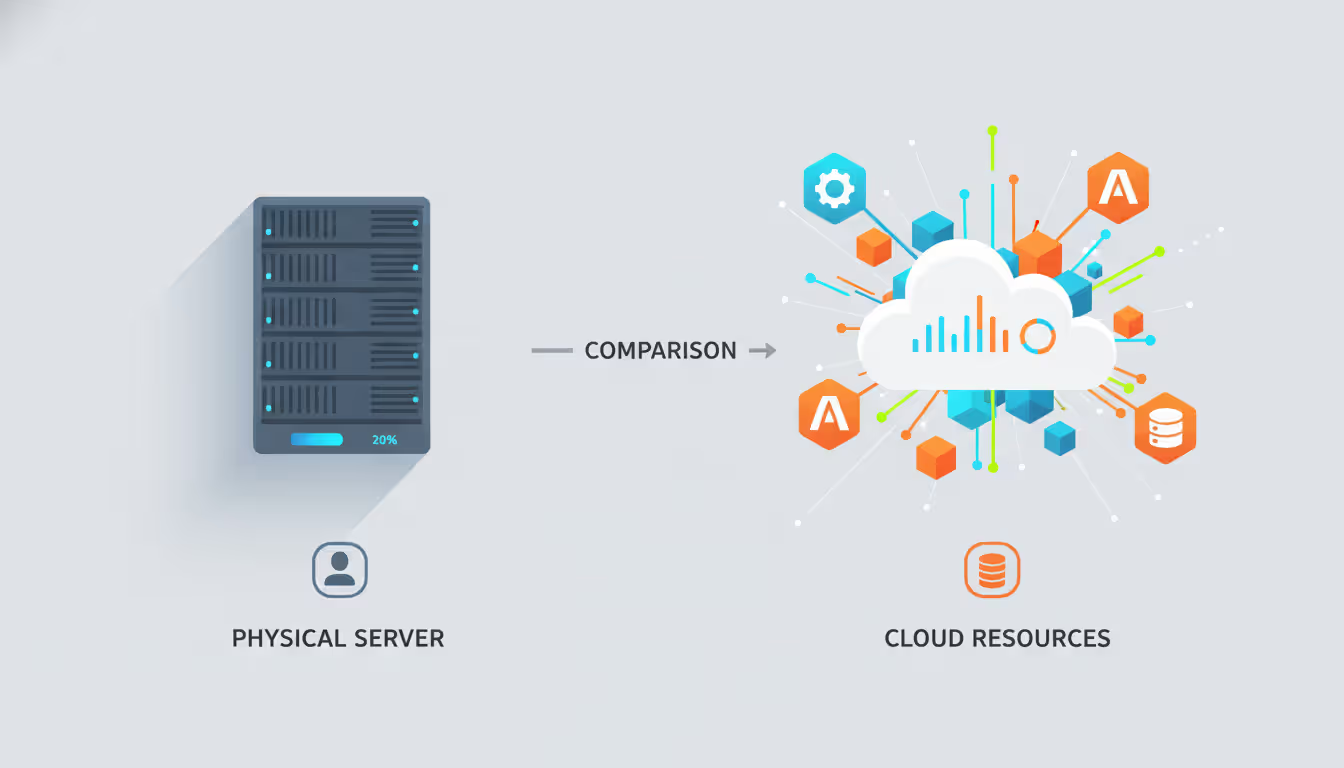
Here's where cloud differs fundamentally from traditional setups. In conventional data centers, you'd purchase a $50,000 physical server, install it in a rack, and dedicate its resources to specific applications. That email server with 16GB of RAM? Those resources sit locked to email duty even when 80% of capacity goes unused overnight.
Cloud architecture flips this model completely. Resources live in shared pools that dynamically redistribute based on actual demand. Your email system might use 4GB at 2 AM when nobody's working, then automatically expand to 12GB during morning rush hours when everyone's catching up on messages. You're not paying for a dedicated server collecting dust—you're renting precisely what you need, when you need it.
This abstraction extends throughout the entire stack. Developers can launch new applications without touching a single piece of hardware, configuring network cables, or installing operating systems. They request resources through code, and the cloud platform handles the underlying complexity automatically.
The real power emerges when your business needs change. Need to handle Black Friday traffic that's 10 times your normal volume? Scale up Thursday evening. Running a tax preparation service that's busy in April but quiet in July? Shrink your infrastructure by 70% during slow months and pay accordingly.
Author: Adrian Keller;
Source: clatsopcountygensoc.com
How Cloud Architecture Works in Cloud Computing
Cloud architecture provides the technical blueprint that makes cloud computing actually function. While "cloud computing" describes what users experience—accessing applications and data over the internet—the architecture defines the engineering underneath.
Picture four distinct layers working in concert. The foundation consists of physical hardware tucked inside data centers: racks of servers, massive storage arrays, industrial networking switches. Most users never see or think about this layer, but it's where everything ultimately executes.
Above the hardware sits the virtualization layer, running software that carves physical machines into hundreds of isolated virtual environments. One physical server might host 50 virtual machines, each running different operating systems and applications, completely unaware of their neighbors.
The orchestration layer manages this entire operation. When you click "deploy" on a new application, this layer springs into action: identifying available resources, spinning up virtual machines, configuring network connectivity, setting security rules, and tracking consumption for billing. All of this happens automatically within seconds or minutes.
Applications occupy the top layer—the actual software your business uses. These might be databases, web applications, analytics platforms, or custom tools your developers built. Each application runs in its allocated space, communicating with other components through programming interfaces.
These layers communicate exclusively through APIs (programming interfaces). When your application needs more storage, it sends an API request to the orchestration layer. That layer interprets the request, allocates storage from available pools, configures access permissions, and returns connection details—usually within 5-10 seconds.
This layered separation creates remarkable flexibility. A retail company might host its main website with one cloud provider while processing credit card transactions through another provider's specialized payment infrastructure. Both systems communicate through encrypted APIs, and customers never notice they're interacting with multiple platforms.
Core Components of Cloud Architecture Design
Three fundamental building blocks form the foundation of any cloud deployment. Understanding how these components interact helps you make better architecture decisions.
Frontend Platform
Everything users directly interact with falls into the frontend category: iPhone apps displaying your product catalog, web portals where employees check schedules, IoT sensors reporting temperature data from warehouses.
Smart frontend design dramatically impacts user experience. Consider caching strategies—storing frequently accessed information locally instead of fetching it repeatedly from backend servers. A news app might cache today's top 20 articles on your phone, only querying the server when you scroll past those headlines. This approach cuts data transfer by 60% and makes the app feel instantaneous.
Progressive web applications represent a modern frontend approach gaining serious traction. They deliver app-like experiences through web browsers without requiring users to download anything from app stores. Companies save the cost and complexity of maintaining separate iOS, Android, and web codebases.
Authentication and input validation happen at the frontend too. Your login form should validate email formats and password requirements before sending data to backend servers, reducing unnecessary network traffic and catching obvious errors immediately.
Backend Platform
The backend powers everything happening behind the curtain: application servers executing business logic, databases storing customer information, file storage systems holding documents and images, processing engines crunching analytics.
Your database strategy significantly impacts both performance and costs. Transactional data—like order processing—typically requires relational databases guaranteeing data consistency. User activity logs work better in NoSQL databases optimized for high-volume writes. Video files and images belong in object storage designed for large files, while applications needing fast disk access require block storage with low latency.
Load distribution becomes critical as traffic grows. Traffic managers spread incoming requests across multiple servers, preventing bottlenecks. If one server crashes or slows down, the load balancer instantly redirects traffic to healthy alternatives. Auto-scaling policies monitor key metrics—when CPU usage crosses 70% for five consecutive minutes, for example—and automatically add capacity.
Here's a real-world scenario: an online concert ticketing platform might run on three servers during normal operations. When a popular artist announces a surprise show, traffic spikes 50x within minutes. Auto-scaling detects the surge and provisions 25 additional servers within three minutes, handling the flood without crashes. Two hours later, when ticket sales stabilize, the system scales back down to five servers.
Network Infrastructure
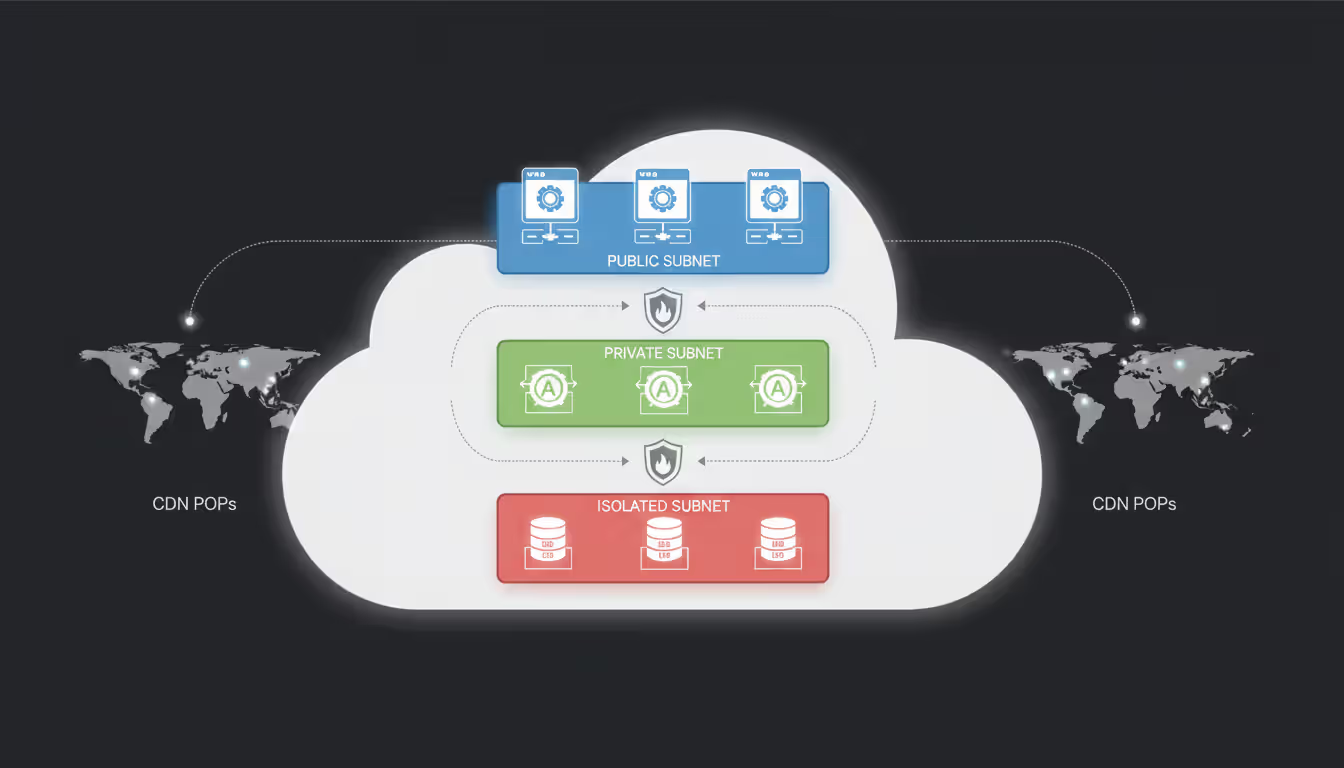
Networks connect all your cloud components while controlling traffic flow and access. This includes virtual networks, subnets, firewalls, VPN connections, and content delivery networks spreading your content across the globe.
Proper network segmentation dramatically improves security. A classic three-tier setup places web servers in a public subnet accessible from the internet, application servers in a private subnet reachable only by web servers, and databases in an isolated subnet accessible exclusively to application servers. Even if hackers compromise your web server, they can't directly access your database.
Content delivery networks cache your static content—images, videos, CSS files, JavaScript—at edge locations worldwide. When someone in Singapore visits your Virginia-based website, they receive cached content from a Singapore edge server rather than pulling everything from Virginia. This cuts page load times from 1,200 milliseconds to 180 milliseconds while reducing bandwidth costs by 60%.
Geographic distribution also enables regional failover. If your primary US-East region experiences an outage, traffic automatically routes to your US-West deployment, maintaining service availability.
Author: Adrian Keller;
Source: clatsopcountygensoc.com
Types of Cloud Architecture Services
Cloud services come in three primary flavors, each offering different trade-offs between control and convenience. Choosing the right model depends on your specific requirements and technical capabilities.
Infrastructure as a Service (IaaS) delivers virtualized computing resources you manage yourself. You rent virtual machines, configure storage volumes, and set up networks, but you're responsible for installing operating systems, applying security patches, and managing everything running on that infrastructure.
IaaS makes sense when you need maximum control. A software company with legacy applications built for specific Linux kernel versions can provision virtual machines matching their exact requirements, install their custom-configured application stack, and migrate with minimal code changes. They control the entire software stack from OS upward.
Platform as a Service (PaaS) removes infrastructure management entirely. You write application code and deploy it to the platform, which automatically handles servers, scaling, patching, and maintenance. The platform manages everything below your application layer.
PaaS accelerates development dramatically. A team building a mobile app backend can focus exclusively on writing API endpoints and business logic. They don't configure servers, debug network issues, or apply security patches at midnight. The platform handles operational details automatically, letting developers ship features instead of managing infrastructure.
Startups especially benefit from PaaS. A three-person team can launch production-ready applications without hiring DevOps specialists or spending weeks on infrastructure setup.
Software as a Service (SaaS) provides complete applications accessible through web browsers or mobile apps. You don't install anything locally or manage any underlying technology—just sign up, configure settings, and start using the software.
SaaS dominates standardized business functions: email, CRM, accounting, collaboration tools, project management. Why build and maintain an email server when Gmail or Outlook 365 costs $6 per user monthly and includes 99.9% uptime guarantees, unlimited storage, spam filtering, and mobile apps?
| Service Type | Your Control | What You Manage | What Provider Manages | Best For | Examples |
| IaaS | Full infrastructure control | Operating systems, applications, security configurations, data | Physical servers, virtualization, storage hardware, network equipment | Migrating existing apps, custom configurations, specialized requirements | AWS EC2, Azure Virtual Machines, Google Compute Engine |
| PaaS | Application-level control | Application code, configuration, data | Runtime environment, operating system, middleware, scaling, infrastructure | New development projects, faster deployment, reduced operations overhead | Heroku, Google App Engine, Azure App Service |
| SaaS | Configuration only | User accounts, permissions, company-specific settings | Everything—infrastructure, platform, application, updates | Standard business functions, rapid adoption, minimal IT overhead | Salesforce, Microsoft 365, Google Workspace |
How to Create a Cloud Architecture Diagram
Architecture diagrams translate complex technical designs into visual representations everyone can understand. Creating useful diagrams requires systematic thinking, not artistic talent.
Start by defining your audience and purpose. Executive presentations need high-level diagrams showing major components and business value—three boxes labeled "Web App," "Database," and "File Storage" might suffice. Implementation teams need detailed technical diagrams documenting every security group rule, subnet configuration, and API endpoint.
Inventory every component methodically. Don't just list the obvious pieces like servers and databases. Include load balancers, caching layers, DNS configurations, third-party APIs, monitoring tools, backup systems, and external SaaS services your applications depend on. A "complete" inventory might contain 40+ items for a moderately complex application.
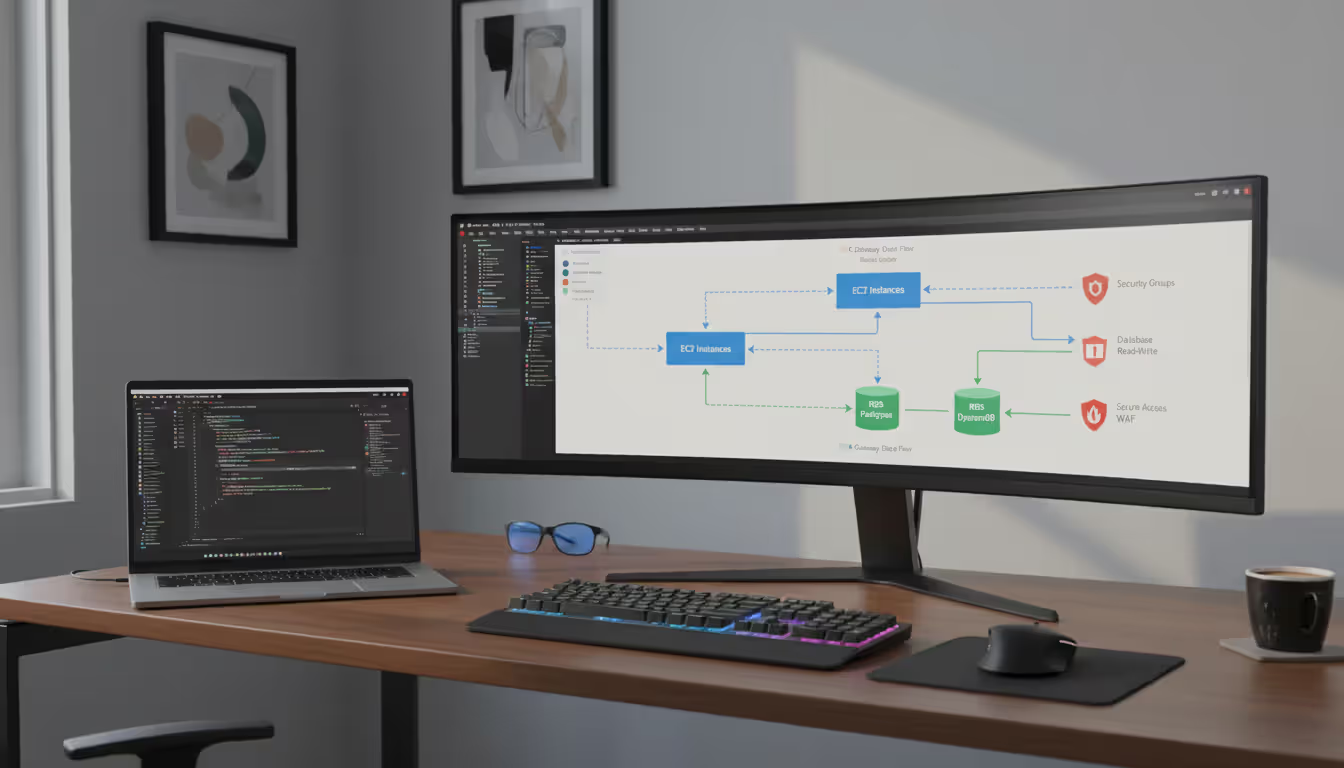
Map connections and data flows explicitly. Arrows aren't decorative—they show how components communicate. Label each connection with protocols (HTTPS port 443, PostgreSQL port 5432, SSH port 22) and indicate whether traffic crosses public internet or stays on private networks. Directional arrows matter: does data flow one-way or bidirectionally?
Adopt consistent visual conventions. Rectangles typically represent compute resources, cylinders indicate databases, document icons show storage, cloud symbols represent external services. Color-code environments consistently: production in blue, staging in yellow, development in green, security components in red. Once you establish conventions, stick with them across all diagrams.
Highlight security boundaries clearly. Draw boxes around network zones showing what sits behind firewalls and what's publicly exposed. Show VPN connections, private subnets, and DMZ configurations. These visual security layers help identify potential vulnerabilities during design reviews—spotting that your database accidentally sits in a public subnet becomes immediately obvious.
Document critical assumptions and constraints. Add notes explaining non-obvious decisions. "Database must reside in EU-West region for GDPR compliance" or "Cache layer supports 10,000 requests/second maximum" provides essential context. Future architects won't waste time questioning decisions that stem from regulatory or performance requirements.
Tools like Lucidchart, Draw.io (free), and Microsoft Visio work well for general diagramming. Cloud providers offer specialized tools: AWS Architecture Icons, Azure Architecture Center templates, Google Cloud Architecture Diagramming Tool. Many teams store diagrams in Git repositories alongside infrastructure code, version-controlling documentation just like application code.
Treat diagrams as living documents. Update them whenever you make significant changes—adding a new microservice, implementing a CDN, restructuring databases. Outdated diagrams actively harm troubleshooting efforts and can cause security incidents when teams make decisions based on incorrect information. Schedule quarterly reviews ensuring diagrams match production reality.
Author: Adrian Keller;
Source: clatsopcountygensoc.com
Common Cloud Architecture Design Patterns
Proven design patterns provide battle-tested solutions to recurring challenges. Understanding these patterns helps you avoid reinventing wheels and benefit from collective industry experience.
Microservices architecture breaks applications into small, focused services that operate independently. Each microservice handles one specific business capability and communicates with other services through well-defined APIs. An e-commerce platform might separate user accounts, product catalog, shopping cart, inventory management, payment processing, and order fulfillment into distinct microservices.
Why bother splitting applications apart? Different components have wildly different scaling requirements. Your product search might handle 50,000 requests per second while payment processing handles 200 requests per second. Microservices let you scale each component independently—running 100 search servers and 3 payment servers instead of scaling everything together.
Teams can also work independently. The catalog team can deploy new search features twice weekly while the payment team deploys monthly after extensive testing. No coordination required.
The downside? Complexity increases substantially. You're managing 30 services instead of one application. You'll need sophisticated monitoring showing how requests flow across services, distributed tracing to debug issues spanning multiple components, and service mesh infrastructure managing service-to-service communication.
Serverless architecture eliminates server management completely. You write individual functions that execute in response to events: HTTP requests, database changes, file uploads, scheduled timers, queue messages. The platform automatically provisions compute resources, runs your code, and charges only for actual execution time measured in milliseconds.
Document processing workflows showcase serverless strengths. When users upload a contract PDF: one function extracts text, another identifies key terms, a third checks for compliance issues, and a final function emails a summary report. Each function runs independently, scales automatically based on upload volume, and costs zero when nobody's uploading documents.
Serverless excels for irregular workloads. A tax prep service experiences massive traffic February through April, then minimal usage May through January. Traditional servers sit idle 8 months yearly—you're paying for capacity you don't use. Serverless eliminates idle costs completely. Zero uploads means zero compute charges.
Watch for cold starts, though. Functions not executed recently take 500-1500ms to initialize when first invoked, potentially causing noticeable delays for user-facing features.
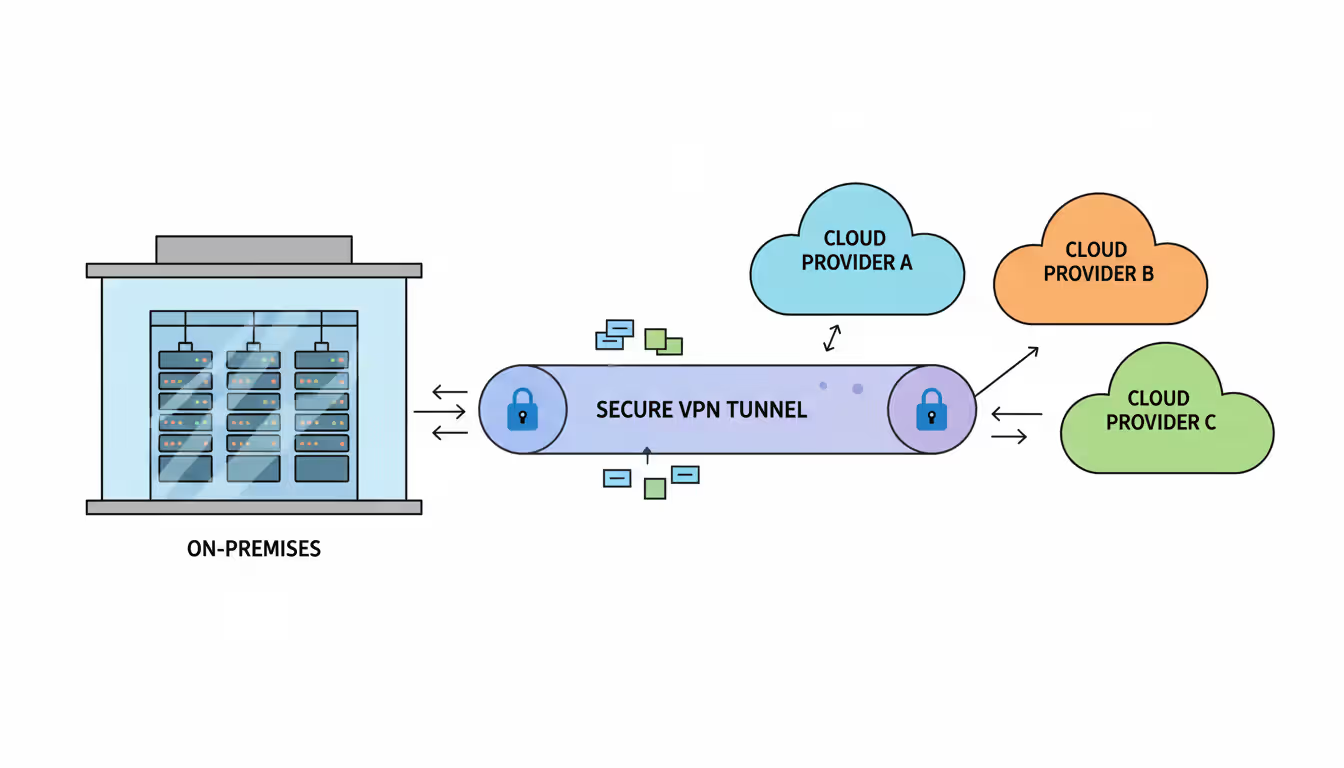
Multi-cloud architecture distributes workloads across multiple cloud providers. An organization might run core applications on AWS, leverage Google Cloud's superior machine learning services, and integrate Azure Active Directory for employee authentication.
This approach prevents vendor lock-in. You're not trapped if one provider raises prices 30% or discontinues critical services. Multi-cloud also provides resilience—when AWS US-East suffered a 7-hour outage in December 2021, companies running multi-cloud failover maintained operations by shifting traffic to Google Cloud or Azure.
Managing multiple platforms requires deeper expertise, though. Your team needs proficiency across different providers' networking, security, and operational tools. Integration complexity increases when services span platforms.
Hybrid cloud architecture combines private data centers with public cloud resources. Organizations keep sensitive systems or legacy applications on-premises while running new applications in public clouds. A healthcare provider might maintain patient records in their private data center (meeting strict regulatory requirements) while using public cloud for patient appointment scheduling and telemedicine video conferencing.
Hybrid makes sense when you have significant existing infrastructure investments or regulatory constraints preventing full cloud migration. Banks often run core banking systems on-premises while using cloud for customer-facing mobile apps and marketing websites.
The challenge involves maintaining consistent security policies, monitoring, and identity management across environments. Employees need single sign-on working seamlessly whether they're accessing on-premises or cloud applications.
Author: Adrian Keller;
Source: clatsopcountygensoc.com
Mistakes to Avoid When Designing Cloud Architecture
Even experienced architects make expensive mistakes. Learning from others' failures beats learning from your own.
Treating security as an afterthought destroys projects. Teams racing to meet launch deadlines often deploy infrastructure quickly, planning to "harden security later." This leaves systems vulnerable for weeks or months and requires expensive retrofitting. One company learned this painfully when hackers discovered their publicly exposed database during the "we'll secure it next sprint" period, stealing 2 million customer records.
Build security into initial designs: implement least-privilege access (users get minimum permissions needed), encrypt data both stored and transmitted, enable comprehensive audit logging, segment networks properly. These decisions are easy when designing from scratch but difficult to retrofit later.
Ignoring cost optimization burns budgets fast. Engineers tend to over-provision "just to be safe"—requesting 32GB RAM when 8GB suffices, running development environments 24/7 when they're only used 40 hours weekly, forgetting to delete test resources after projects end.
We've seen monthly cloud bills jump from $5,000 to $47,000 in six months because nobody monitored spending. A development environment running nights and weekends wastes 70% of its budget. Implement auto-shutdown schedules, right-size instances based on actual usage metrics (not guesses), set up budget alerts, and review cost reports monthly identifying waste.
Skipping disaster recovery planning creates existential risk. Cloud services generally provide excellent reliability, but individual components still fail. Without backup strategies and tested recovery procedures, simple mistakes cause catastrophic data loss. One startup accidentally deleted their production database and discovered their "backup system" hadn't worked for three months—they lost everything.
Implement automated backups running daily at minimum, test restoration procedures quarterly (actually restore data and verify it works), document recovery time objectives for each system, and maintain runbooks explaining recovery steps.
Recreating monolithic architectures in the cloud wastes cloud benefits. Simply moving an existing monolithic application to virtual machines—without redesigning for cloud-native patterns—produces inflexible systems that can't scale efficiently. You've moved the problem to a more expensive environment.
Break monoliths into loosely coupled services communicating through APIs. Each service should scale independently based on its specific demand patterns.
Building on proprietary services creates vendor lock-in that limits future flexibility. Cloud providers offer convenient proprietary services, but heavy dependence on unique APIs makes migration extremely difficult and expensive. One company spent $2.3 million and 18 months rewriting applications to switch cloud providers because they'd built exclusively on proprietary services.
Balance convenience against portability. Use open standards where feasible (Kubernetes instead of provider-specific container services, PostgreSQL instead of proprietary databases). Abstract provider-specific services behind interfaces you could potentially reimplement.
Deploying without proper monitoring blinds teams to problems. Without comprehensive logging, performance metrics, and request tracing, troubleshooting becomes expensive guesswork. You'll spend hours investigating issues that proper monitoring would identify in minutes.
Implement centralized logging from day one, establish baseline performance metrics, create alerts for anomalous behavior. When response times suddenly jump from 200ms to 1,500ms, you should know within minutes—not when customers start complaining.
The biggest mistake organizations make is treating cloud architecture as a one-time decision rather than an ongoing discipline. Your architecture must evolve as your business grows, technologies mature, and requirements change. Build flexibility into your designs and review architectural decisions quarterly to ensure they still align with business objectives
— Werner Vogels
Frequently Asked Questions
Cloud architecture represents far more than technical diagrams and infrastructure configurations. It fundamentally shapes how your organization delivers digital services, responds to market shifts, and manages technology spending. The transition from fixed infrastructure to flexible, scalable cloud systems has permanently altered how businesses operate.
Success demands understanding core architectural components, selecting appropriate service models for your specific requirements, and applying proven design patterns while avoiding common pitfalls that undermine cloud benefits—security oversights, runaway costs, inflexible designs that can't evolve with business needs.
Effective cloud architectures balance competing priorities: performance, security, cost efficiency, reliability, and long-term maintainability. No single "correct" architecture exists for all situations. A startup launching a new SaaS product faces completely different constraints than an established manufacturer migrating legacy ERP systems. Your architecture should reflect your organization's specific requirements, risk tolerance, technical capabilities, and growth trajectory.
Treat cloud architecture as a continuous discipline rather than a one-time project. Quarterly reviews ensure your architecture continues serving business objectives as technologies evolve and requirements change. Organizations investing in solid architectural foundations position themselves to capitalize on emerging opportunities while maintaining the operational stability and security their business demands.
The companies thriving in cloud environments share one characteristic: they view architecture as strategic infrastructure deserving careful planning and ongoing attention. Those treating it as a tactical IT project typically struggle with reliability issues, cost overruns, and technical limitations that constrain growth. Choose your approach wisely.
Related Stories
Read more

Read more




The content on this website is provided for general informational and educational purposes related to cloud computing, network infrastructure, and IT solutions. It is not intended to constitute professional technical, engineering, or consulting advice.
All information, tools, and explanations presented on this website are for general reference only. Network environments, system configurations, and business requirements may vary, and results may differ depending on specific use cases and infrastructure.
This website is not responsible for any errors or omissions, or for actions taken based on the information, tools, or technical recommendations presented.