

Browser console showing HTTP header error messages with a security shield icon and blurred server racks in the background
What Is access-control-allow-headers?

Your JavaScript app tries fetching data from another domain, and suddenly everything breaks. The network tab shows a failed request, the console screams about CORS, and you're left wondering what happened. Nine times out of ten, the culprit is access-control-allow-headers—a response header that decides whether your custom HTTP headers can cross domain boundaries. Miss it in your server config, and your API calls won't even reach your backend. Configure it properly, though, and cross-domain requests flow smoothly while keeping security tight.
Understanding CORS and HTTP Response Headers
Here's the deal: browsers don't let JavaScript on yoursite.com casually request data from someapi.com and read what comes back. That's the same-origin policy doing its job. Without this safeguard, a malicious script could hijack your Gmail session or drain your bank account just by running on a sketchy website you visited.
Cross-Origin Resource Sharing exists to carve out controlled exceptions to this rule. When your browser spots a cross-origin request, it examines specific HTTP response headers from the target server. Think of these headers as an access control list—basically permission slips that spell out which origins, methods, and headers get the green light.
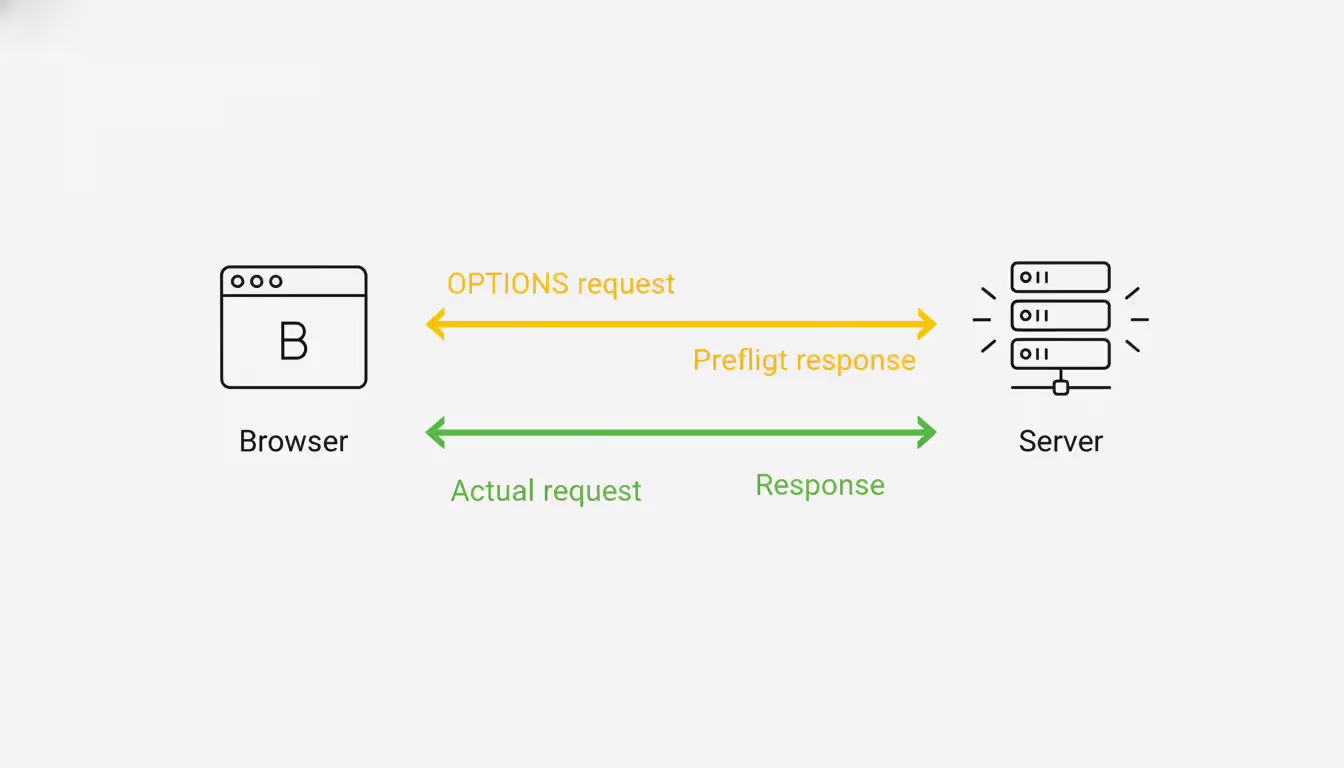
Simple requests (basic GET or POST with vanilla content types) skip straight to the point. The browser sends them immediately and checks response headers afterward. But anything more ambitious—custom headers, PUT or DELETE methods, exotic content types—triggers a preflight check first. The browser fires off an OPTIONS request, essentially asking "Hey, would you accept this kind of request?" before committing.
Author: Adrian Keller;
Source: clatsopcountygensoc.com
The server's preflight response needs the right CORS headers. Missing them? The browser kills the actual request before it launches, and your app just sees an error. The access-control-allow-headers piece matters most when your API expects authentication tokens, specialized content types, or custom metadata that standard requests don't carry.
I've watched developers spend hours debugging why their perfectly good request won't work. Usually it's because they set access-control-allow-origin but forgot that custom headers need their own explicit permission. The browser doesn't care that your server-side code would've accepted that Authorization header—it never gets that far.
How access-control-allow-headers Controls Request Headers
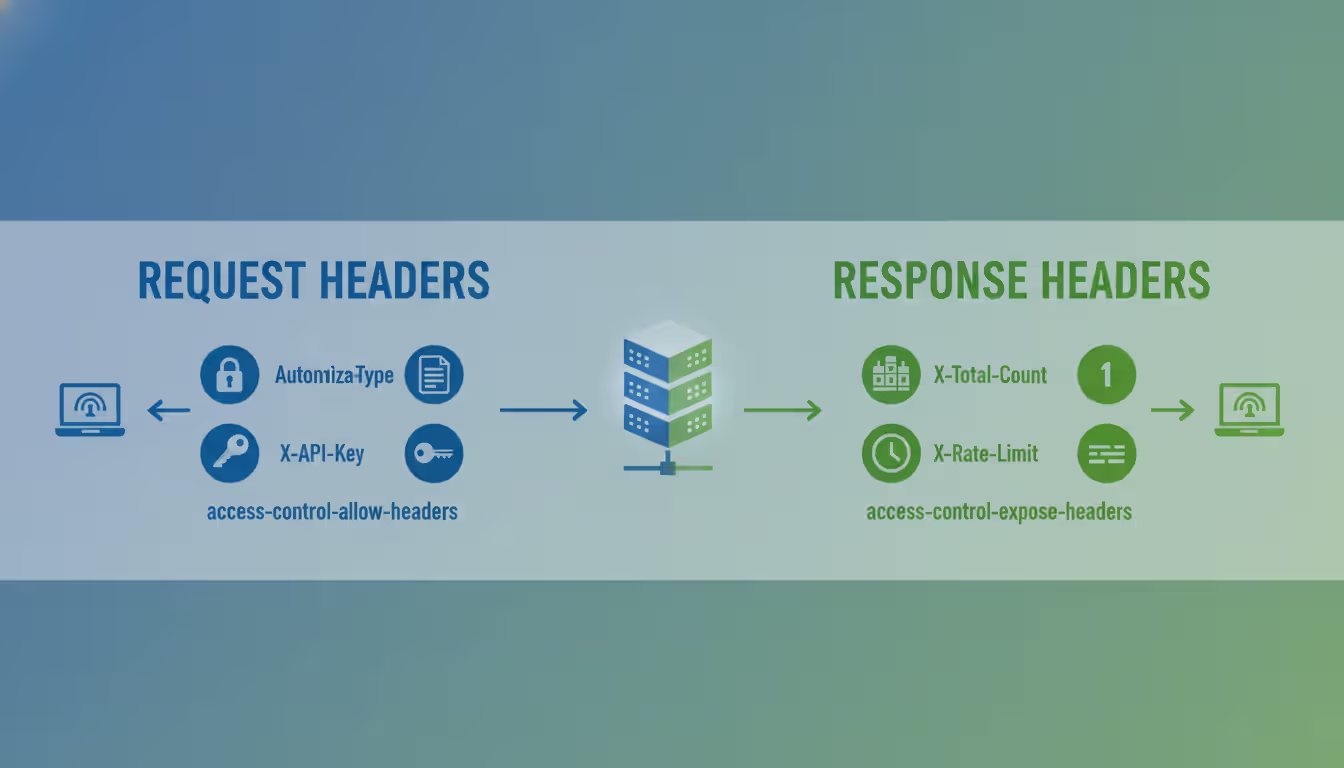
This header tells browsers which HTTP headers they're allowed to include in the real request. During preflight, the server must respond with a list of every custom header the client plans to use.
Here's the basic format:
access-control-allow-headers: X-Custom-Header, Content-Type, Authorization
Browsers give you a freebie set of "CORS-safelisted" headers: Accept, Accept-Language, Content-Language, and Content-Type (but only for three specific values). Everything else? You've got to name it explicitly in access-control-allow-headers.
Headers that almost always need permission: - Authorization (bearer tokens, basic auth, you name it) - Content-Type when you're sending application/json - Anything custom like X-API-Key, X-Request-ID, X-CSRF-Token
The wildcard * exists but comes with strings attached. If credentials enter the picture (cookies, HTTP auth, TLS certificates), wildcards are off the table. The browser demands explicit header names whenever access-control-allow-credentials: true appears.
Case doesn't matter for header values, though convention uses that canonical hyphenated style. String multiple headers together with commas. Spaces after commas? Optional, but they make scanning easier.
A preflight failure doesn't mean your server rejected the request. It means the browser never sent it in the first place. That Authorization header in your fetch call? Ignored completely if the preflight response doesn't greenlight it.
Common Configuration Examples and Syntax
Implementation looks different depending on your stack. Here's what works across popular platforms.
Node.js with Express:
app.use((req, res, next) => { res.header('access-control-allow-origin', 'https://example.com'); res.header('access-control-allow-headers', 'Content-Type, Authorization, X-Request-ID'); res.header('access-control-allow-methods', 'GET, POST, PUT, DELETE'); if (req.method === 'OPTIONS') { return res.sendStatus(200); } next();
});
That OPTIONS check prevents your actual routes from trying to process preflight requests. I've seen devs skip this step, then scratch their heads when preflights return 404 despite correct headers.
Apache (.htaccess or virtual host):
Header set access-control-allow-origin "https://example.com"
Header set access-control-allow-headers "Content-Type, Authorization, X-API-Key"
Header set access-control-allow-methods "GET, POST, PUT, DELETE" RewriteEngine On
RewriteCond %{REQUEST_METHOD} OPTIONS
RewriteRule ^(.*)$ $1 [R=200,L]
You'll need mod_headers enabled first. The RewriteRule catches OPTIONS requests and bounces back status 200 immediately.
Nginx:
location /api/ { if ($request_method = 'OPTIONS') { add_header 'access-control-allow-origin' 'https://example.com'; add_header 'access-control-allow-headers' 'Content-Type, Authorization, X-Custom-Header'; add_header 'access-control-allow-methods' 'GET, POST, PUT, DELETE'; add_header 'access-control-max-age' 86400; return 204; } add_header 'access-control-allow-origin' 'https://example.com' always; # ... rest of your configuration
}
The always parameter matters more than you'd think. Without it, headers vanish on error responses, turning legitimate 401 or 500 errors into confusing CORS failures instead.

Author: Adrian Keller;
Source: clatsopcountygensoc.com
Python Flask:
from flask import Flask, request
from flask_cors import CORS app = Flask(__name__)
CORS(app, resources={ r"/api/*": { "origins": "https://example.com", "allow_headers": ["Content-Type", "Authorization", "X-Request-ID"] }
})
Flask-CORS handles preflight automatically once configured. It won't default to wildcards, though—you've got to spell out every header.
Working with Related CORS Headers
CORS headers operate as a team. Configuring access-control-allow-headers alone won't cut it.
access-control-allow-credentials and Header Restrictions
Need to send cookies or use HTTP authentication across origins? You'll set access-control-allow-credentials: true. This single header rewrites the rules for everything else.
With credentials enabled, wildcards become forbidden: - access-control-allow-origin must name an exact origin, not * - access-control-allow-headers requires listing every header explicitly - access-control-allow-methods needs each method spelled out
Why so strict? Credentials give requests serious power. Allowing wildcards with credentials would let any random website make authenticated requests as your users—a security nightmare waiting to happen.
Here's what works:
res.header('access-control-allow-origin', 'https://app.example.com');
res.header('access-control-allow-credentials', 'true');
res.header('access-control-allow-headers', 'Content-Type, Authorization');
Your client code needs matching settings:
fetch('https://api.example.com/data', { credentials: 'include', headers: { 'Content-Type': 'application/json', 'Authorization': 'Bearer token123' }
});
Forget either piece and authentication fails mysteriously. Cookies don't send, or the server rejects everything outright.
access-control-allow-origin for Multiple Domains
The access-control-allow-origin header takes exactly one origin or the wildcard. Supporting several specific domains means generating headers dynamically based on each request's Origin header.
const allowedOrigins = [ 'https://app.example.com', 'https://staging.example.com', 'https://admin.example.com'
]; app.use((req, res, next) => { const origin = req.headers.origin; if (allowedOrigins.includes(origin)) { res.header('access-control-allow-origin', origin); res.header('access-control-allow-credentials', 'true'); } res.header('access-control-allow-headers', 'Content-Type, Authorization'); next();
});
This keeps security intact while juggling multiple frontends. Don't get fancy with regex on origins unless you really know what you're doing. Accidentally accepting https://evil-example.com because it contains "example.com" opens a huge hole.
access-control-expose-headers for Response Access
While access-control-allow-headers governs request headers, access-control-expose-headers controls which response headers JavaScript can actually read. Browsers expose simple headers like Content-Type, Content-Length, and Cache-Control automatically. Everything custom stays hidden without explicit permission.
Custom response headers remain invisible otherwise:
res.header('access-control-expose-headers', 'X-Total-Count, X-Rate-Limit-Remaining');
res.header('X-Total-Count', '1500');
res.header('X-Rate-Limit-Remaining', '42');
Without that expose header, calling response.headers.get('X-Total-Count') in your client returns null even though the header definitely came back in the response. This trips up people building pagination or rate-limiting features constantly.
Author: Adrian Keller;
Source: clatsopcountygensoc.com
Troubleshooting Common CORS Header Errors
Browser console CORS errors read like cryptic poetry. Here's how to decode them.
"Request header field authorization is not allowed by access-control-allow-headers in preflight response"
Your preflight response forgot the header name. Check that OPTIONS handler and make sure it includes:
access-control-allow-headers: Authorization
Using middleware? Verify it runs before route handlers. Framework execution order matters.
"The value of the 'access-control-allow-origin' header must not be the wildcard '*' when credentials mode is 'include'"
You set credentials: 'include' in fetch but the server responds with access-control-allow-origin: *. Change the server to specify the exact origin:
res.header('access-control-allow-origin', req.headers.origin);
res.header('access-control-allow-credentials', 'true');
And validate that origin against a whitelist before setting it.
"Method PUT is not allowed by access-control-allow-methods"
The preflight response omitted the HTTP method. Add it:
access-control-allow-methods: GET, POST, PUT, DELETE, PATCH
Preflight validates both methods and headers. Both need permission.
Silent failures with no error message
Open the network tab and find the OPTIONS request. If it's returning 404 or 500, your server isn't handling preflights at all. You need an OPTIONS handler that returns 200-204 with CORS headers before application routes execute.
Headers work in Postman but the browser fails
Postman skips CORS enforcement entirely—it's a browser-specific security feature. Postman doesn't bother with the preflight dance. Always test CORS configs in real browsers.
Security Considerations and Best Practices
The most common CORS mistakes I see aren't about understanding the specification—they're about treating these headers as obstacles to work around rather than security boundaries to respect. When developers use wildcards everywhere or disable CORS entirely, they're not solving a problem; they're creating one. Proper CORS configuration means your API explicitly states its security policy, and that clarity benefits everyone
— Alex Chen
CORS headers exist for security, but mess them up and they create vulnerabilities instead of preventing them.
Skip the blanket wildcards in production. Sure, access-control-allow-origin: * and access-control-allow-headers: * feel convenient during development. But they completely undermine same-origin policy. Now any website can query your API and read responses.
Apply least privilege here: allow only the origins, methods, and headers your application actually uses. If your API only needs Content-Type and Authorization, don't wildcard or pad the list "just to be safe."
Validate origins dynamically. When supporting multiple domains, maintain an explicit allowlist and verify incoming Origin headers:
const allowedOrigins = new Set([ 'https://app.example.com', 'https://partner.example.org'
]); const origin = req.headers.origin;
if (allowedOrigins.has(origin)) { res.header('access-control-allow-origin', origin);
}
Never reflect the Origin header blindly. An attacker sends Origin: https://malicious.com, and if you echo it back without checking, you've just granted access.
Think hard about credentials. Enabling access-control-allow-credentials means cookies and auth headers cross origins. Powerful, yes. Dangerous? Also yes. Make sure your CSRF protections are solid. Consider whether you genuinely need credentials or if token-based auth in headers would work better.
Set reasonable cache durations. The access-control-max-age header tells browsers how long to cache preflight responses. Too high (weeks, months) and your CORS policy changes take forever to propagate. Too low and you're drowning in OPTIONS requests. Something between 600-3600 seconds (10-60 minutes) balances performance and flexibility.

Author: Adrian Keller;
Source: clatsopcountygensoc.com
Monitor and log CORS failures. Server-side logging won't catch browser-blocked requests, but tracking OPTIONS requests and their responses reveals configuration problems. Consider logging when requests arrive without proper CORS headers—could indicate misconfiguration or someone probing your API.
Access control lists in networking traditionally work at network or transport layers, controlling which IP addresses or ports communicate. CORS implements that same concept at the application layer. Instead of IP ranges, the access control list defines permitted origins and headers. Same fundamental purpose: explicit permission systems defaulting to deny.
Comparison of Common CORS Headers
| Header | Purpose | Syntax Example | When Required |
| access-control-allow-headers | Specifies which request headers are permitted | Content-Type, Authorization | When client sends custom headers or non-simple Content-Type values |
| access-control-allow-origin | Defines which origin can access the resource | https://example.com or * | Required for all CORS requests |
| access-control-allow-methods | Lists permitted HTTP methods | GET, POST, PUT, DELETE | Required for preflight requests using non-simple methods |
| access-control-allow-credentials | Indicates if credentials are allowed | true | When requests need to include cookies or authentication |
| access-control-expose-headers | Specifies which response headers JavaScript can read | X-Total-Count, X-RateLimit | When server sends custom response headers the client needs to access |
| access-control-max-age | How long (seconds) to cache preflight results | 3600 | Optional but recommended to reduce preflight frequency |
Frequently Asked Questions About access-control-allow-headers
The access-control-allow-headers HTTP response header plays a central role in CORS security, defining exactly which request headers browsers permit in cross-origin requests. Getting it right means understanding how multiple CORS headers interact, implementing proper preflight handling, and maintaining strict security practices around origin validation and credential handling.
Stop viewing CORS as an annoyance to bypass. It's a security boundary protecting your users. Configure headers explicitly, avoid wildcards when handling credentials, and test thoroughly in browsers where CORS enforcement actually happens. When preflights fail, systematically verify your OPTIONS handler, double-check header spelling and syntax, and ensure your configuration matches what your application genuinely needs.
The line between a smooth-running API and one plagued by CORS errors often comes down to these details. Master the relationship between access-control-allow-headers and related CORS headers, and you'll ship web applications that communicate securely across domains without endless debugging cycles.
Related Stories

Read more

Read more




The content on this website is provided for general informational and educational purposes related to cloud computing, network infrastructure, and IT solutions. It is not intended to constitute professional technical, engineering, or consulting advice.
All information, tools, and explanations presented on this website are for general reference only. Network environments, system configurations, and business requirements may vary, and results may differ depending on specific use cases and infrastructure.
This website is not responsible for any errors or omissions, or for actions taken based on the information, tools, or technical recommendations presented.