

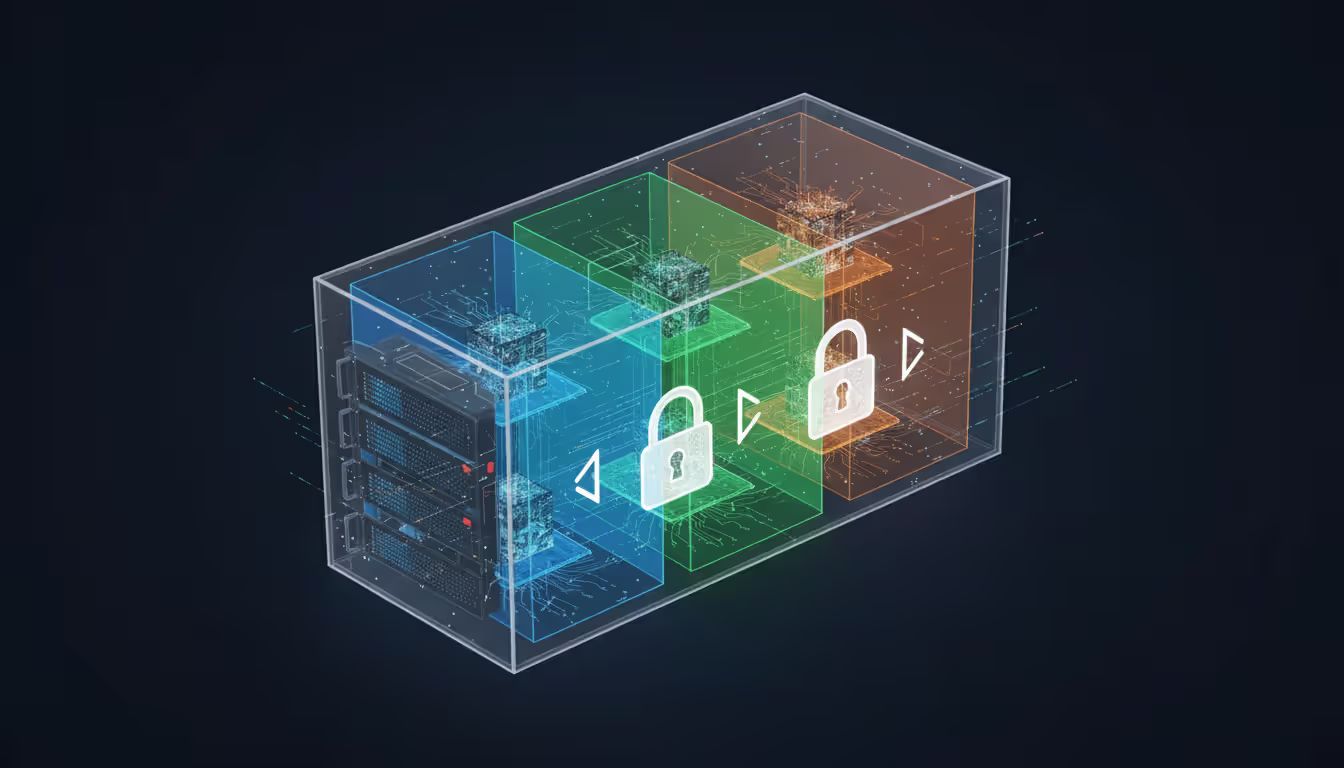
Modern data center with glowing blue isolated network zone inside server racks representing virtual private cloud concept
Virtual Private Cloud Guide

Content
Content
Cloud infrastructure presents IT teams with a real dilemma. You want the cost benefits of shared servers—no hardware purchases, no maintenance contracts—but you can't just throw sensitive data onto public systems alongside everyone else's workloads. Virtual private clouds bridge this gap by giving you an isolated chunk of a provider's infrastructure that you control like your own data center.
What Is a Virtual Private Cloud and How Does It Work
Here's what you get with a VPC: a cordoned-off network space inside AWS, Azure, or Google Cloud that other customers can't touch. Picture a co-working space where you lease an entire private suite instead of a desk in the shared area—you're still in the same building, using the same elevators and Wi-Fi backbone, but nobody else can walk into your locked office.
Software-defined networking makes this isolation possible. Your traffic never mingles with another company's packets, even when your virtual machines run on the same physical hardware. The hypervisor—that's the software layer managing virtual machines—enforces these boundaries. Break through them, and a provider's entire business model collapses overnight.
Setting up a VPC starts with picking an IP address range. Most people use private address blocks like 10.0.0.0/16 (which gives you 65,536 addresses to work with). You'll carve this range into smaller chunks called subnets, spreading them across different data centers for redundancy.
What makes up a VPC? Let's break down the pieces:
Subnets divide your address space into smaller sections. You'll create public ones that can reach the internet—useful for web servers that need to respond to customer requests—and private ones that stay locked down, perfect for databases that should only talk to your application layer. I've seen teams make everything public by default because it's easier, then panic when they realize they've exposed database ports to the entire internet.
Route tables act like GPS for your network traffic. They contain rules saying "send anything going to 10.0.0.0/8 to our internal network" or "route 0.0.0.0/0 through the internet gateway." Get these wrong and traffic disappears into a black hole.
Security groups work like bouncers for individual servers. They're stateful, meaning if they let a request in, the response automatically goes back out—you don't need separate outbound rules. By default, they block everything inbound until you explicitly punch holes for specific ports and sources.
Network ACLs add a second firewall layer at the subnet level. Unlike security groups, these are stateless. Allow traffic in? You need another rule to allow the response out. This catches people off guard constantly—they open port 443 inbound but forget the outbound rule, then wonder why HTTPS connections fail.
Compare this to straight public cloud services where your resources might share network segments with strangers, protected mainly by application-level security. Or look at traditional on-premises setups where you own the switches and routers but sink six figures into hardware that depreciates the moment you rack it. VPCs give you network control without the capital expenditure.
The isolation goes deep. Even if your VM shares physical CPU cores with someone else's (and it probably does), the hypervisor prevents any packet leakage between VPCs. Providers bet their entire reputation on this boundary—one breach and customers flee en masse.
Author: Derek Hollowell;
Source: clatsopcountygensoc.com
Key Benefits of Using Virtual Private Clouds
Security drives VPC adoption more than any other factor. Banks and hospitals choose virtual private clouds because they can build network segmentation that mirrors their compliance requirements. Put your payment processing servers in a private subnet with zero internet access, forcing every connection through a hardened bastion host that logs everything. Try doing that with basic public cloud instances.
Compliance auditors love VPCs. When you're proving PCI DSS compliance, you need to demonstrate that credit card data lives in an isolated network segment. A properly configured VPC gives you exported firewall rules and network diagrams that satisfy auditors much faster than application-level controls alone.
Scalability turns from a procurement nightmare into an API call. Retail sites preparing for Black Friday can configure auto-scaling groups that spin up 50 additional web servers in under ten minutes. After the holidays, those servers terminate and billing stops. Your network architecture stays rock-solid while compute resources expand and contract beneath it.
You dodge huge infrastructure costs by sharing the provider's physical gear while maintaining logical separation. No need to buy $15,000 firewalls or $30,000 load balancers. A three-person startup can deploy enterprise-grade networking for a few hundred bucks monthly instead of the quarter-million required for comparable on-premises equipment.
Hybrid cloud integration lets you extend existing data centers into the cloud without rewriting applications. Manufacturing companies keep their ERP systems on-site (those Oracle databases aren't moving) while pushing analytics workloads to VPCs. Encrypted tunnels connect both environments, making them appear as one network to your applications.
Resource provisioning becomes fast and granular. Development teams can deploy complete environments—load balancers, databases, caching layers, the works—in two hours instead of two months. Project ends? Delete the entire stack without leaving zombie resources draining your budget.
Virtual Private Cloud vs Virtual Private Server
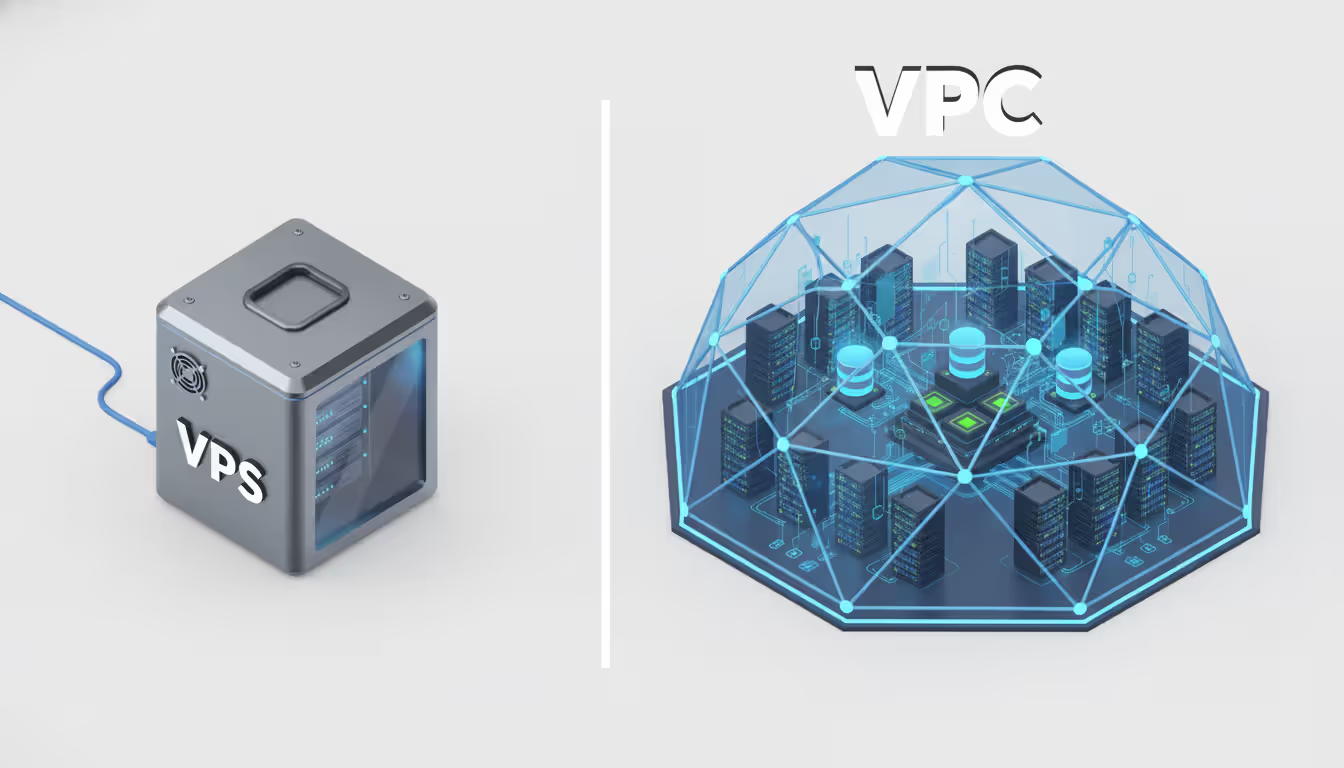
These terms confuse people constantly, but they describe completely different things. A VPS is one partitioned slice of a physical server—you get an isolated operating system with dedicated RAM and disk space. A VPC is an entire network that might contain hundreds of servers plus databases, load balancers, and storage arrays.
Rent an apartment versus lease an office building. That's VPS versus VPC.
Architecture differs fundamentally. With a VPS, you get root access to one machine and basic control over its network interface—maybe one public IP and simple firewall rules. VPCs give you subnet design, custom routing across dozens of servers, multiple firewall layers, and the ability to architect complex multi-tier applications.
Use cases split based on complexity. VPS works fine for straightforward needs: a WordPress blog, a small business site, a solo developer's test server. You need compute power but not sophisticated networking. VPCs become necessary when you're orchestrating microservices across Kubernetes clusters, building three-tier applications with separated presentation and data layers, or linking cloud resources back to your office network.
Performance and isolation have subtle differences. VPS providers typically pack 20–40 customers onto each physical server. Your CPU and RAM are dedicated, but disk I/O and network bandwidth get shared—"noisy neighbors" running intensive jobs can slow your VPS to a crawl. VPC instances also share hardware, but network isolation runs deeper. Your VPC's internal traffic never competes with another customer's packets.
Free virtual private server options do exist. Oracle Cloud's free tier includes two small VPS instances permanently. Google Cloud Platform gives you one micro instance. AWS offers 750 hours monthly for the first year. Great for learning or tiny personal projects. But "free VPC" is marketing doublespeak—you get free compute instances that happen to run inside a VPC, not actual VPC-level features like multiple subnets or VPN gateways.
Rule of thumb: if everything fits on one or two servers and you don't need load balancing or hybrid connectivity, a VPS costs less and simplifies operations. Hit three servers or need any form of advanced networking? VPC capabilities and economics win.
Author: Derek Hollowell;
Source: clatsopcountygensoc.com
How Virtual Private Gateways Connect Your Infrastructure
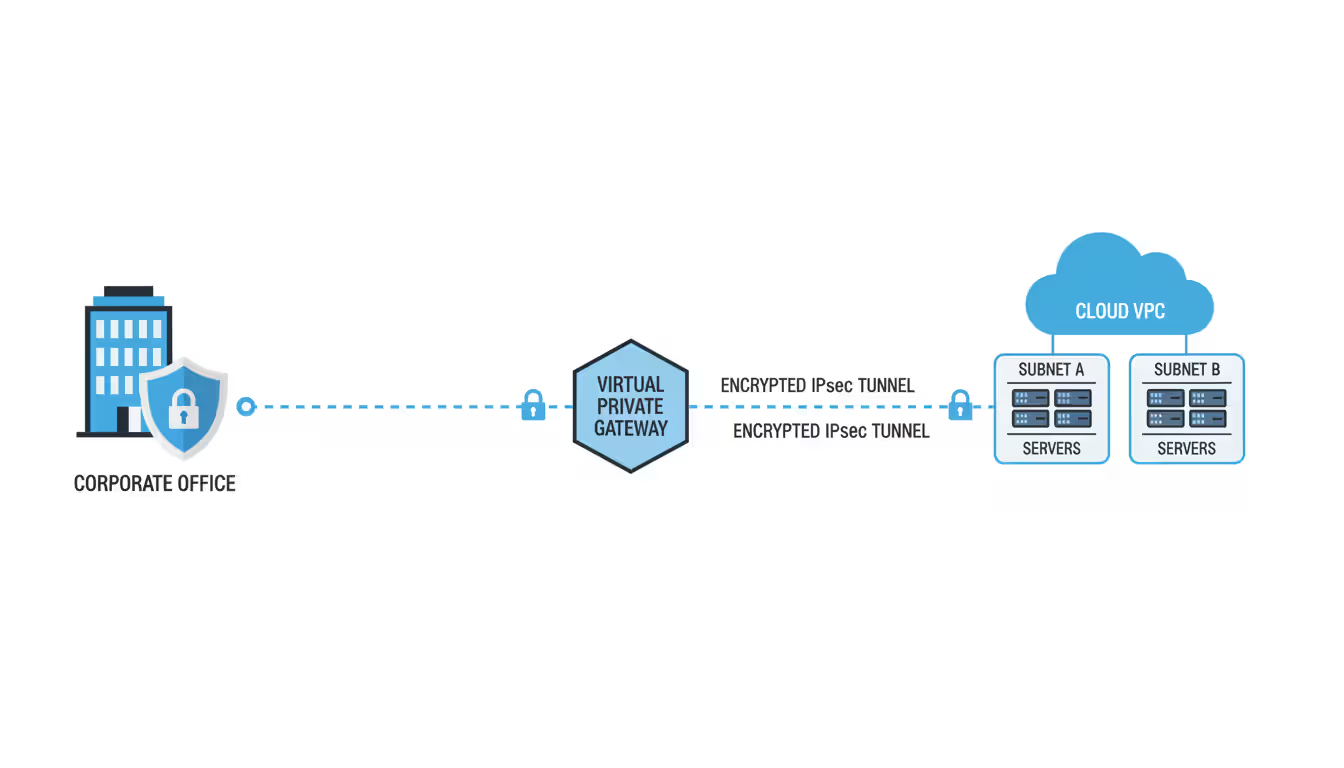
A virtual private gateway anchors the cloud end of VPN connections between your VPC and external networks. Think of it as a heavily secured door in your VPC's wall—traffic flows through, but only with the right credentials and approved routes.
The gateway attaches to your VPC and handles multiple simultaneous connections. You might tunnel to headquarters in Denver, a warehouse in Atlanta, and a partner company's network—all through one gateway.
Site-to-site VPN connections use standard IPsec protocols to build encrypted tunnels over regular internet. Configuration means matching encryption algorithms on both ends. Mismatched settings—your firewall uses AES-256, the gateway expects AES-128—cause failures with cryptic error codes that waste hours of troubleshooting.
Providers create two tunnels per VPN connection by default, each terminating at separate physical locations for redundancy. Your firewall should maintain both tunnels and fail over automatically when one degrades. Yet countless admins configure just one tunnel to save 15 minutes, then face outages during routine provider maintenance.
Direct Connect and dedicated links skip the public internet completely, running over fiber circuits from carriers like Equinix or Megaport. A 10 Gbps Direct Connect costs thousands monthly but delivers consistent latency and better throughput than VPN tunnels, which typically max out around 1.25 Gbps due to encryption overhead.
For many applications, latency trumps bandwidth. Database replication might tolerate 100 Mbps speeds but breaks if latency exceeds 50ms. Direct Connect usually gives you 1–5ms latency to the provider's edge, while VPN over internet fluctuates wildly between 10–100ms depending on routing.
Security considerations multiply with gateways. Each VPN tunnel is a potential doorway into your VPC, so route tables must precisely limit what crosses the gateway. A sloppy route pointing 0.0.0.0/0 at your gateway might accidentally route all internet traffic through your corporate firewall, creating bottlenecks and surprise data transfer charges.
BGP routing adds flexibility at the cost of complexity. Dynamic routing lets your on-premises network advertise routes automatically, updating VPC route tables when you add subnets. But BGP mistakes create routing loops or black holes that take down entire environments. Start with static routes until you really understand your setup.
Use certificate-based authentication instead of pre-shared keys when possible. Certificates rotate cleanly and provide stronger verification. Pre-shared keys get embedded in config files, forgotten, and left unchanged for years.
Author: Derek Hollowell;
Source: clatsopcountygensoc.com
Choosing Between Virtual Private Cloud Providers
Looking only at hourly compute prices misses the real cost picture. A provider that's 20% cheaper but lacks certifications you need becomes infinitely expensive when you can't deploy production workloads.
Security features vary in details that matter. All major providers offer security groups and network ACLs, but implementations differ. AWS security groups can reference other security groups as traffic sources, simplifying microservices rules. Azure Network Security Groups use priority-based processing where the first match wins. Google Cloud firewall rules also use priorities but apply at the VPC level by default instead of individual instances.
Compliance certifications determine whether you can use a provider at all. Healthcare requires HIPAA compliance and business associate agreements. Government work needs FedRAMP authorization. Payment processing demands PCI DSS validation. Major providers check these boxes, but coverage varies by region and service. A database might be PCI-certified in US regions but not yet approved in Asia-Pacific.
Pricing models hide complexity in fine print. AWS charges $0.01–0.02 per GB for data transfer between availability zones. Google Cloud makes cross-zone traffic within a region free. Azure charges for outbound internet but not VNet-to-VNet traffic in the same region. A chatty microservices app generating terabytes of internal traffic will see wildly different bills.
Support tiers create traps. Basic support might be email-only with 24-hour response times—useless when production crashes at 3 AM. Business support costs hundreds monthly for phone access and faster responses. Enterprise support runs thousands monthly but includes a dedicated technical account manager.
| Provider | Starting Cost | Distinctive Features | Certifications | Ideal Workloads | Gateway Types |
| AWS VPC | Free VPC + resource costs | Extensive service catalog, Transit Gateway, mature ecosystem | HIPAA, PCI DSS, FedRAMP High, SOC 2 Type II | Complex multi-tier apps, serverless architectures | VPN Gateway, Direct Connect (50 Mbps–100 Gbps), Transit Gateway |
| Azure VNet | Free VNet + resource costs | Deep Active Directory integration, excellent hybrid tools | HIPAA, PCI DSS Level 1, FedRAMP High, ISO 27001 | Enterprise Microsoft shops, .NET applications | VPN Gateway, ExpressRoute (50 Mbps–100 Gbps), Virtual WAN |
| Google Cloud VPC | Free VPC + resource costs | Global VPC spanning regions, live VM migration, custom subnet modes | HIPAA, PCI DSS, FedRAMP Moderate, ISO 27001 | Data analytics pipelines, Kubernetes workloads | Cloud VPN, Cloud Interconnect (10–200 Gbps), Cloud Router |
| Oracle Cloud VPC | Free tier with 2 VMs | Bare metal instances, predictable flat pricing | HIPAA, PCI DSS, FedRAMP Moderate, SOC 2 Type II | Oracle database migrations, budget-conscious projects | Site-to-Site VPN, FastConnect (1–10 Gbps) |
Industry patterns influence choices. Media companies favor AWS for content delivery and video transcoding services. Gaming studios lean toward Google Cloud for global low-latency networking. Enterprises with Microsoft licensing often pick Azure to leverage existing agreements and seamless AD integration.
Migration and vendor lock-in deserve serious thought. Proprietary services like AWS Lambda or Azure Functions create dependencies that make switching brutally expensive. Containerized workloads on Kubernetes port more easily, though managed Kubernetes implementations still differ enough to cause headaches. Using open standards—vanilla PostgreSQL instead of Aurora, standard Kubernetes instead of provider extensions—maintains flexibility but means foregoing some optimization.
Regional presence matters for latency-sensitive apps. A provider with data centers in Southeast Asia delivers better performance there than one with only US and European presence. Compliance might mandate data never leave specific countries, eliminating some provider options entirely.
Virtual Private Cloud Hosting Setup and Best Practices
IP address planning comes first, and most people skip this step then regret it. Pick a CIDR block large enough for growth but not so large you waste addresses or create conflicts with networks you'll VPN to later.
A /16 block like 10.0.0.0/16 provides 65,536 addresses—plenty for most organizations. Break this into /24 subnets (256 addresses each). Allocate at least two subnets per availability zone: one public, one private. Leave address space for future expansion. Adding subnets later is trivial, but some providers won't let you expand the VPC's CIDR block after creation.
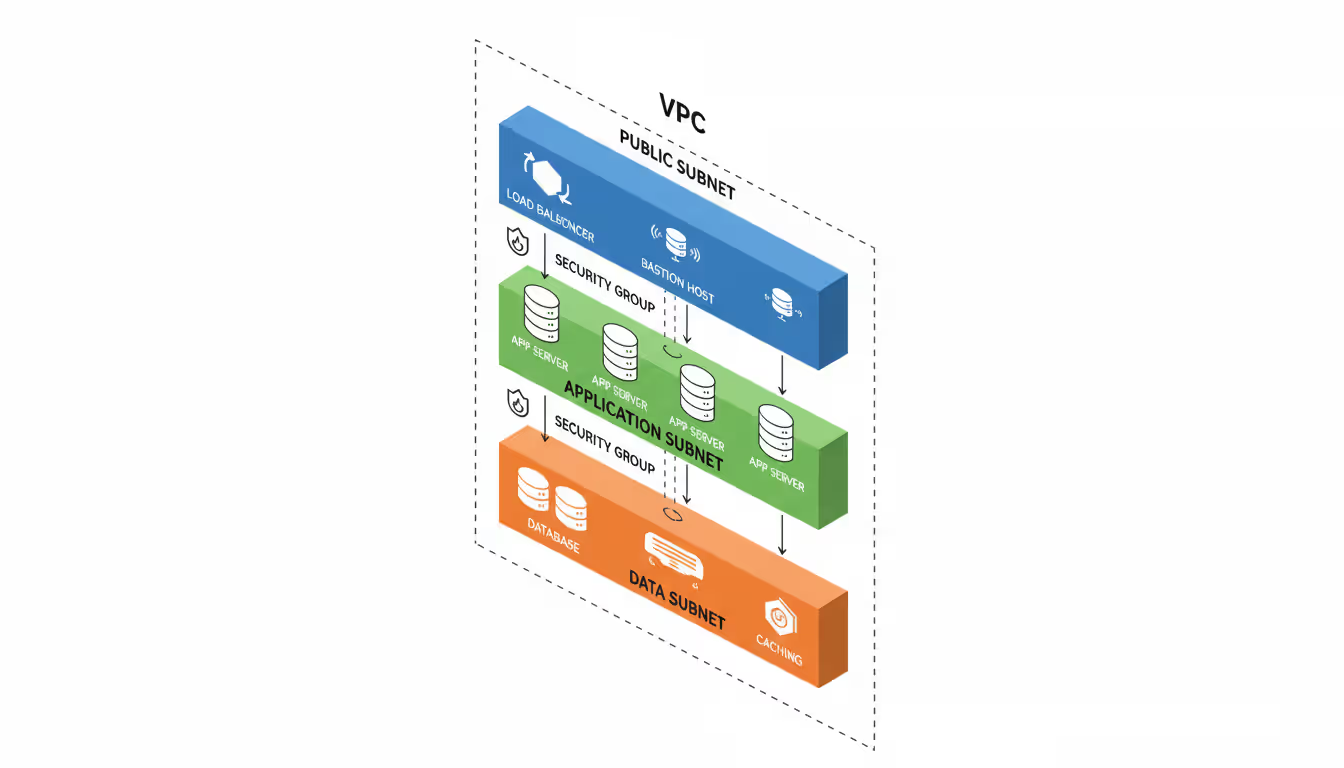
Network segmentation should map to security boundaries. A three-tier web app needs minimum three subnet types:
- Public subnets for load balancers and jump boxes
- Private application subnets for web and app servers
- Private data subnets for databases and caches
Sensitive environments need deeper segmentation. Payment processing might get dedicated subnets with security groups allowing connections only from specific application servers. Logging infrastructure might live in separate subnets with one-way traffic flows—logs come in, but logging systems can't initiate connections elsewhere.
Access control and identity integration prevents credential sprawl. Instead of creating VPC-specific users, federate to your existing identity provider. AWS IAM roles for EC2, Azure Managed Identities, and Google Cloud service accounts let applications access resources without hardcoded credentials.
Bastion hosts provide controlled admin access. Put them in public subnets with security groups permitting SSH/RDP only from your office IPs. Everything else lives in private subnets accepting connections only from the bastion. Every admin session flows through the bastion where you log commands and sessions.
Multi-factor authentication should be mandatory for any account that can modify VPCs. A stolen password shouldn't let attackers delete security groups or change route tables.
Monitoring and optimization prevent surprise bills and breaches. Enable VPC flow logs to capture traffic metadata—source/destination IPs, ports, protocols, byte counts. These don't capture packet contents (too expensive) but reveal traffic patterns.
Flow log analysis catches common issues:
- Unexpected outbound connections (possible data theft)
- High inter-subnet traffic (optimization candidates)
- Rejected connections (misconfigurations or attacks)
- Asymmetric routing (traffic enters one path, returns via another)
Cost optimization targets data transfer, often the second-biggest expense after compute. Cross-zone traffic costs money; design applications to minimize it. Use VPC endpoints (PrivateLink, Private Link, Private Service Connect) to reach provider services without internet routing, saving money and improving security.
Tag every resource consistently for cost allocation. Tag subnets, security groups, and route tables with owner, environment (dev/staging/prod), and cost center. Without tags, a $10,000 bill becomes an archaeological dig to figure out who's responsible.
Author: Derek Hollowell;
Source: clatsopcountygensoc.com
Common Virtual Private Cloud Implementation Mistakes
Security group misconfigurations cause most VPC breaches. The worst error: opening ports to 0.0.0.0/0 (the entire internet) for services that should be internal. An RDS database with port 3306 open to the world shows up in automated scans within hours and faces brute-force attacks almost immediately.
Reference other security groups instead of IP ranges when possible. Rather than allowing 10.0.1.0/24 to access your database, allow the application-tier security group. When you scale app servers, database access adjusts automatically without manual edits.
Default "allow all outbound" rules seem convenient but prevent data loss prevention. A compromised app server can exfiltrate data anywhere on the internet. Restrict outbound to specific destinations—your APIs, third-party services you use, package repos for updates. This contains breaches.
Subnet planning failures manifest several ways. Too few subnets force mixing security contexts—dev and prod resources in the same subnet can't be separated by ACLs. Too many subnets fragment address space and complicate routing.
Making all subnets identical size wastes space. Your database tier might need 20 IPs while application tier needs 200. Don't allocate /24 blocks (256 addresses) to everything. Use /27 (32 addresses) for small tiers, /23 (512 addresses) for large ones.
Forgetting to spread subnets across availability zones kills redundancy. If all subnets live in one zone, a zone failure takes down everything. Distribute each tier across minimum two zones, preferably three.
Compliance requirements overlooked during initial build create expensive rework. HIPAA demands encryption in transit and at rest, audit logging, and access controls. Building without these then retrofitting compliance often means rebuilding entire components.
Identify which frameworks apply first (HIPAA, PCI DSS, SOC 2, GDPR), then map VPC requirements to controls. PCI DSS requires network segmentation between cardholder environments and other systems—translate this to separate subnets with tight security groups and ACLs. Document architecture and controls during build, not after.
Data residency catches people off guard. GDPR restricts EU citizen data transfers outside Europe without safeguards. Deploying VPCs in US regions when serving European customers might violate requirements. Understand data residency rules before selecting regions.
Disaster recovery planning gets skipped until something breaks. Version VPC configs in infrastructure-as-code (Terraform, CloudFormation, ARM templates) stored in source control. Manual console changes create undocumented dependencies that break during rebuilds.
Backup strategies must account for network dependencies. Restoring database backups into VPCs with different subnet CIDR blocks breaks apps with hardcoded IPs. Use DNS names instead of IPs. Document network architecture assumptions.
Test DR procedures quarterly minimum. A DR plan existing only on paper will fail when needed. Actually failing over to backup VPCs reveals documentation gaps, missing configs, and wrong assumptions about recovery times.
The technology matters less than the discipline VPCs force on you.When you design a VPC, you must explicitly decide what talks to what. That exercise alone prevents more incidents than firewalls ever will. I've watched organizations catch architectural flaws during VPC design that would've become production vulnerabilities in less structured setups. The network boundaries make you think through trust relationships before deploying anything. You can't just throw servers up and hope for the best
— Marcus Chen
Frequently Asked Questions
Virtual private clouds merge traditional network security with cloud scale and economics. They deliver the isolation enterprises demand while avoiding the capital costs and inflexibility of physical infrastructure. Decisions made during VPC design—subnet layouts, security strategies, gateway configs—establish patterns that ripple through your entire cloud deployment.
Success requires balancing security against usability, isolation against connectivity, cost against capability. Organizations investing time in proper planning, implementing security from the start, and documenting architectures gain environments that scale efficiently while maintaining security under growth. Those rushing implementation or treating VPCs as simple networking create technical debt that becomes increasingly expensive to fix.
The provider landscape keeps maturing. Transit gateways, private endpoints, and advanced routing simplify complex architectures that previously required third-party appliances. Choosing the right provider depends less on feature counts and more on alignment with your workloads, compliance needs, and existing technology investments.
Whether migrating from on-premises infrastructure, building cloud-native applications, or implementing hybrid architectures, a well-designed VPC provides the foundation for secure, scalable operations. The complexity is real but manageable. The payoff in security, compliance, and operational flexibility justifies the learning curve for any organization serious about cloud infrastructure.
Related Stories
Read more

Read more



The content on this website is provided for general informational and educational purposes related to cloud computing, network infrastructure, and IT solutions. It is not intended to constitute professional technical, engineering, or consulting advice.
All information, tools, and explanations presented on this website are for general reference only. Network environments, system configurations, and business requirements may vary, and results may differ depending on specific use cases and infrastructure.
This website is not responsible for any errors or omissions, or for actions taken based on the information, tools, or technical recommendations presented.