

Modern network operations center with large screens displaying network traffic flows and packet data visualization in dark blue tones
What Is Packet Capture?

Content
Content
Every second, millions of data packets travel across networks worldwide, carrying emails, video streams, financial transactions, and confidential business communications. When networks slow down, security breaches occur, or applications malfunction, network administrators need visibility into this invisible traffic. Packet capture provides that window into network activity, enabling teams to diagnose problems, detect threats, and maintain optimal performance.
Understanding Packet Capture Basics
Packet capture is the process of intercepting and recording data packets as they travel across a network. Think of it as installing a security camera on a highway—except instead of vehicles, you're monitoring digital information units called packets.
Network packets are small chunks of data, typically ranging from 64 to 1,518 bytes. Each packet contains two main components: the payload (actual data being transmitted) and headers (metadata including source address, destination address, protocol information, and error-checking codes). When you send an email or load a webpage, your data gets broken into these packets, transmitted across various network devices, and reassembled at the destination.
The technical process works through network interface cards (NICs) operating in promiscuous mode. Normally, a NIC only processes packets addressed to its specific MAC address. In promiscuous mode, it accepts all packets traveling across the network segment, regardless of destination. Specialized software or hardware then copies these packets to a buffer, timestamps them, and stores them for analysis.
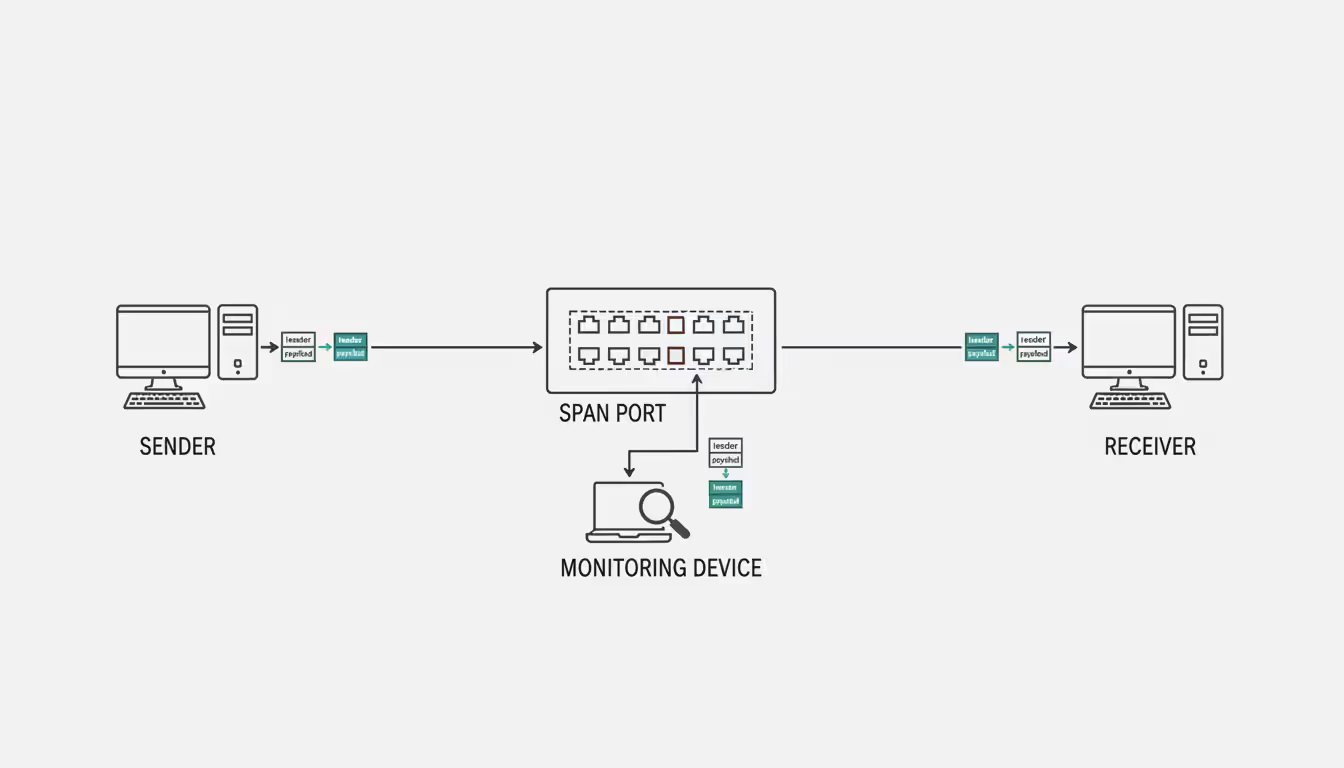
On switched networks—which most modern networks are—administrators typically configure a SPAN (Switched Port Analyzer) port or mirror port. This copies traffic from one or more ports to a monitoring port where capture equipment connects. On older hub-based networks, capturing was simpler since hubs broadcast all traffic to every port.
Author: Adrian Keller;
Source: clatsopcountygensoc.com
The capture process generates files containing raw packet data. These files preserve exact copies of network traffic, including all header information and payload content. Analysts can later replay this traffic, examine individual conversations between systems, or search for specific patterns indicating problems or security threats.
Why Organizations Use Packet Capture
Network troubleshooting represents the most common use case. When users complain about slow application performance, packet capture reveals whether the problem stems from network latency, packet loss, misconfigured devices, or application-level issues. For example, a retail company experiencing intermittent point-of-sale system failures might capture traffic during an outage and discover that a firmware bug causes the payment gateway to drop TCP connections after exactly 300 seconds.
Security threat detection relies heavily on packet analysis. While firewalls and intrusion detection systems flag suspicious activity, packet capture provides the evidence needed to understand attack vectors. A financial services firm might notice unusual DNS queries in captured traffic—a sign of malware attempting to communicate with command-and-control servers. The captured packets show exactly which internal systems are compromised and what data might have been exfiltrated.
Performance monitoring extends beyond simple bandwidth measurements. Packet-level analysis reveals application behavior that aggregate statistics miss. A healthcare provider might use packet capture to discover that their electronic health records system makes 47 separate database queries to load a single patient chart—explaining why doctors wait 15 seconds for records to appear.
Compliance requirements in regulated industries mandate packet capture capabilities. Financial institutions must demonstrate they can detect and investigate unauthorized access attempts. Healthcare organizations need to prove they monitor systems handling protected health information. These regulations don't always require continuous capture, but organizations must have the capability ready when needed.
Forensic investigation after security incidents depends on historical packet data. When a manufacturing company discovers that proprietary designs were stolen three months ago, packet captures from that period can reveal exactly how attackers moved laterally through the network, which credentials they compromised, and what files they transferred.
You can't secure what you can't see
— Scott Charney
How Packet Capture Analysis Works
The capture process begins with defining scope. Capturing all traffic on a busy network segment generates terabytes of data daily. Smart administrators use capture filters to limit collection to relevant traffic. A filter might specify "capture only traffic to or from the database server on port 3306" or "capture packets containing the word 'error' in the payload."
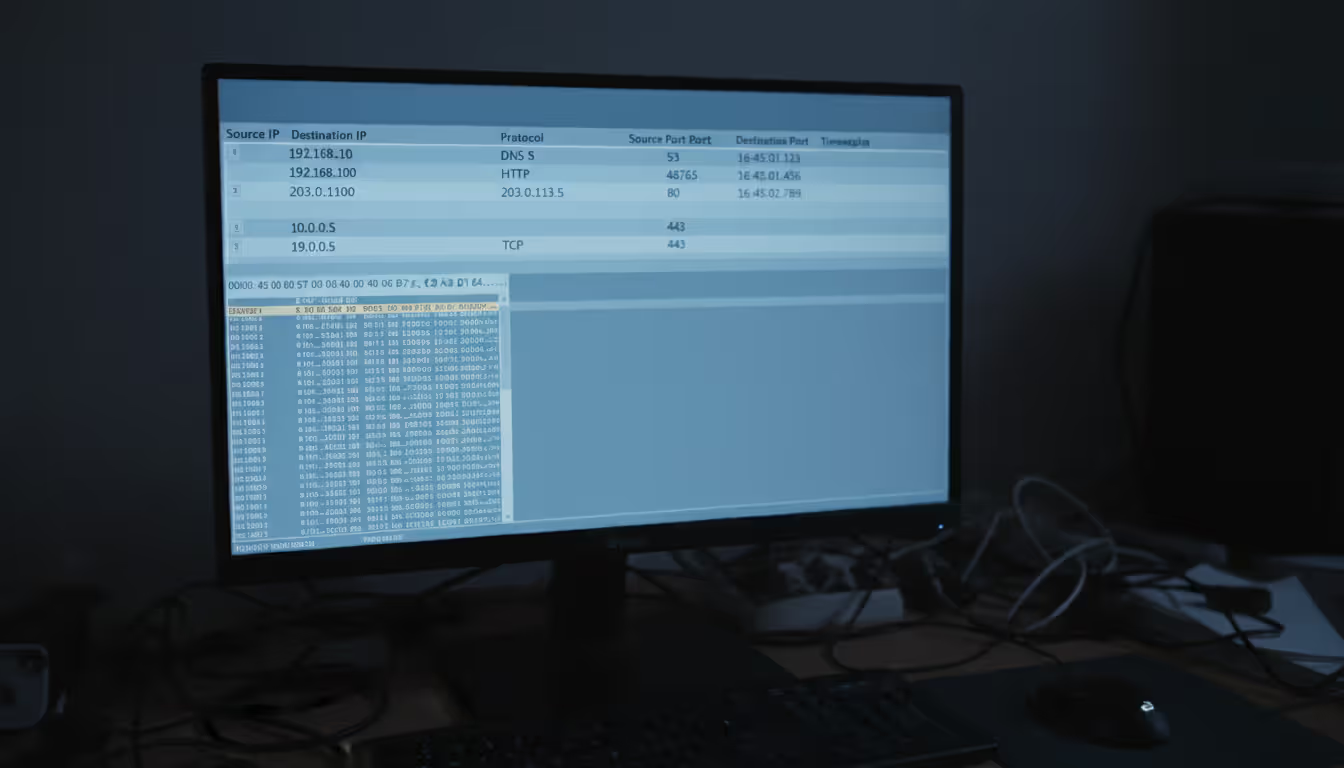
Once captured, packets require filtering and decoding. Raw packet data appears as hexadecimal values meaningless to humans. Protocol decoders translate these values into readable information. A decoder recognizes that bytes starting with 0x45 indicate IPv4 packets, extracts the source IP from bytes 12-15, and displays it as 192.168.1.100 instead of C0 A8 01 64.
Author: Adrian Keller;
Source: clatsopcountygensoc.com
Protocol analysis examines how applications communicate. Analysts reconstruct entire conversations between systems by following TCP streams. For instance, analyzing an HTTP conversation reveals the client request ("GET /index.html HTTP/1.1"), server response code (200 OK), and the actual HTML content transmitted. This reconstruction helps identify whether problems occur during connection establishment, data transfer, or connection teardown.
Identifying anomalies requires understanding normal behavior. An analyst might notice that HTTPS traffic to a financial website contains unusually small packets—potentially indicating a man-in-the-middle attack where an attacker intercepts and modifies traffic. Or they might spot DNS responses containing IP addresses that don't match legitimate servers.
Real-world packet capture analysis solved a puzzling case for a logistics company. Warehouse scanners randomly stopped communicating with the inventory system. Network graphs showed no errors or packet loss. Packet analysis revealed that scanners sent data correctly, but the server's responses occasionally arrived fragmented. The warehouse's aging wireless access point couldn't handle fragmented packets properly—a problem that only became visible through detailed packet examination.
Types of Packet Capture Tools
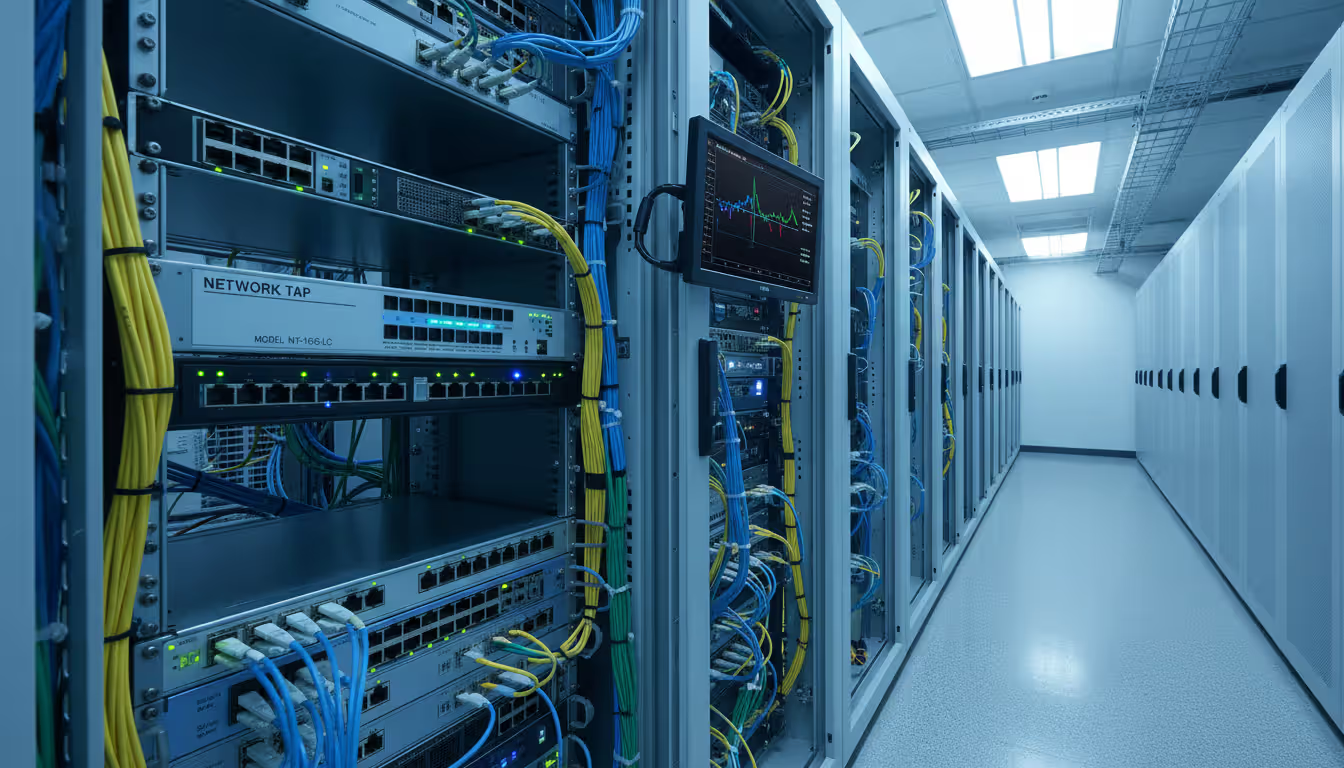
Hardware solutions use dedicated appliances with specialized network processors. These devices handle high-speed networks (10 Gbps, 40 Gbps, or 100 Gbps) without dropping packets. A network tap—a physical device inserted into a network cable—copies all traffic to a monitoring port with zero performance impact. Hardware solutions cost anywhere from $5,000 for basic taps to $500,000+ for enterprise-grade packet brokers that aggregate traffic from multiple network segments.
Software solutions run on standard servers or workstations. They're more affordable and flexible but limited by the host system's processing power and network interface capabilities. A software-based tool might drop packets on a heavily loaded 10 Gbps link if the CPU can't keep pace with traffic volume.
Open-source options like Wireshark and tcpdump provide powerful capabilities at no licensing cost. Organizations pay only for the hardware to run them and staff time for configuration and maintenance. Commercial options offer professional support, pre-built integrations with security platforms, and user-friendly interfaces that reduce training requirements.
Cloud-based tools capture traffic from virtual networks in AWS, Azure, or Google Cloud environments. They integrate with cloud-native logging and monitoring services. Traditional on-premises tools struggle with cloud environments where you can't install physical taps or configure mirror ports on provider-managed infrastructure.
Comparison Table of Popular Solutions
| Solution | Cost | Deployment Type | Ease of Use | Protocol Support | Best Use Case |
| Wireshark | Free (open-source) | Desktop software | Moderate learning curve | 2,000+ protocols | Detailed troubleshooting and education |
| tcpdump | Free (open-source) | Command-line tool | Steep learning curve | Most common protocols | Automated capture on servers/Linux systems |
| SolarWinds NPM | $2,995+ per year | On-premises software | User-friendly GUI | 1,200+ protocols | Enterprise network monitoring with packet analysis |
| PRTG Network Monitor | Free (100 sensors) to $15,000+ | On-premises or cloud | Easy setup, intuitive interface | All major protocols | Small to medium businesses needing all-in-one monitoring |
| CloudShark | $20/user/month | Cloud-based SaaS | Very easy, web-based | All Wireshark protocols | Distributed teams sharing packet captures |
Key Features to Look For
Capture performance specifications matter more than marketing claims. Look for tools that specify maximum capture rate (packets per second and bits per second) and buffer size. A tool claiming "wire-speed capture" should specify at what speed—1 Gbps wire-speed differs dramatically from 100 Gbps.
Protocol support determines what traffic you can analyze. Basic tools decode TCP, UDP, and HTTP. Comprehensive packet capture solutions recognize specialized protocols like SCADA systems used in manufacturing, medical device protocols in healthcare, or financial trading protocols. If you run SAP, Salesforce, or custom applications, verify the tool can decode those protocols.
Author: Adrian Keller;
Source: clatsopcountygensoc.com
Storage management features prevent capture files from consuming all available disk space. Look for automatic file rotation (creating new files after reaching size or time limits), compression (reducing storage by 60-80%), and retention policies (automatically deleting captures older than specified periods).
Integration capabilities extend packet capture value. Tools that export data to SIEM platforms, ticketing systems, or analytics databases enable correlation with other security and operations data. An integrated tool might automatically create a help desk ticket when packet analysis detects application errors.
Filtering and search capabilities separate basic from advanced tools. Real-time filtering reduces captured data volume. Post-capture filtering and search let you find specific conversations in multi-gigabyte files. Advanced tools offer queries like "show me all failed database login attempts from external IP addresses during business hours."
Common Packet Capture Mistakes to Avoid
Capturing without proper filters creates massive files containing mostly irrelevant data. A network engineer once set up continuous full capture on their data center uplink, generating 8 TB daily. After three days, storage filled completely, crashing several systems. Targeted capture with filters like "capture only traffic to/from critical servers" or "capture only packets with TCP errors" provides useful data without overwhelming storage.
Ignoring legal and privacy concerns exposes organizations to lawsuits and regulatory penalties. Packet captures contain sensitive information—passwords (if sent unencrypted), personal data, proprietary business information, and private communications. An IT administrator who captured all network traffic and shared files with colleagues faced criminal wiretapping charges when employee personal emails appeared in the captures.
Insufficient storage planning causes packet loss during capture or inability to retain historical data. Calculate storage requirements before deploying: if you capture 1 Gbps of traffic with 40% average utilization, you generate approximately 4.3 TB daily. Multiply by your retention period and add 30% overhead. Many organizations discover their planned storage lasts days instead of the intended months.

Author: Adrian Keller;
Source: clatsopcountygensoc.com
Lack of analysis skills turns packet capture into expensive data hoarding. Capturing packets is straightforward; understanding what they reveal requires knowledge of network protocols, application behavior, and attack patterns. Organizations sometimes invest in enterprise capture tools but lack staff who can interpret the data, leaving security threats and performance problems undetected despite having complete evidence.
Not securing captured data creates security risks. Packet capture files are essentially copies of your network traffic. If attackers obtain these files, they gain insights into your network architecture, application vulnerabilities, and potentially credentials or sensitive data. Encrypt stored captures, restrict access to authorized personnel, and delete files after retention periods expire.
Legal and Privacy Considerations
Federal wiretap laws under 18 U.S.C. § 2511 prohibit intercepting electronic communications without consent. However, the "business use exception" allows employers to monitor communications on company-owned networks for legitimate business purposes. This exception has limits—monitoring must relate to business operations, not personal surveillance of employees.
Employee monitoring regulations vary by state. Connecticut, Delaware, and Texas require employers to notify employees about electronic monitoring. California's privacy laws impose stricter requirements when monitoring could capture personal information. Federal contractors face additional restrictions under various security regulations.
Data protection compliance under regulations like CCPA (California Consumer Privacy Act) and sector-specific laws affects packet capture. Captures containing customer data might fall under "personal information" requiring protection, retention limits, and disclosure in privacy policies. Healthcare organizations must ensure packet capture complies with HIPAA requirements for protecting electronic protected health information.
Consent requirements depend on who you're monitoring and why. Monitoring your own corporate network with proper employee notification typically doesn't require individual consent. Capturing traffic on public Wi-Fi networks, monitoring partner or customer traffic, or capturing communications involving external parties raises complex consent issues. A managed service provider capturing client network traffic should have explicit contractual authorization.
Best practice: implement a formal packet capture policy. Document legitimate business purposes (security monitoring, troubleshooting, compliance), specify who can authorize captures, define retention periods, establish access controls, and outline employee notification procedures. This policy provides legal protection and operational guidelines.
Frequently Asked Questions About Packet Capture
Packet capture transforms invisible network traffic into actionable intelligence. Whether you're troubleshooting application performance, investigating security incidents, or ensuring compliance with regulatory requirements, packet-level visibility provides answers that aggregate statistics and logs cannot deliver.
Success with packet capture requires more than just tools. You need clear objectives for what you're monitoring, appropriate legal and policy frameworks, sufficient storage infrastructure, and staff with analysis skills. Start with targeted captures addressing specific problems rather than attempting to capture everything everywhere. As your team develops expertise and your infrastructure matures, you can expand capture scope and retention periods.
The network security landscape continues evolving, with encrypted traffic, cloud migration, and increasing network speeds creating new challenges. Modern packet capture solutions address these through SSL decryption capabilities, cloud-native capture tools, and hardware acceleration for high-speed networks. Organizations that master packet capture gain a competitive advantage—faster problem resolution, stronger security posture, and deeper understanding of how their applications and networks actually behave under real-world conditions.
Related Stories

Read more

Read more



The content on this website is provided for general informational and educational purposes related to cloud computing, network infrastructure, and IT solutions. It is not intended to constitute professional technical, engineering, or consulting advice.
All information, tools, and explanations presented on this website are for general reference only. Network environments, system configurations, and business requirements may vary, and results may differ depending on specific use cases and infrastructure.
This website is not responsible for any errors or omissions, or for actions taken based on the information, tools, or technical recommendations presented.